

Description
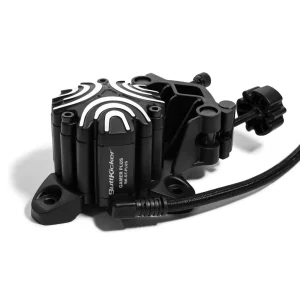
ButtKicker Gamer PRO: Enhance Your Sim Racing Experience
Take your racing setup to the next level with the ButtKicker Gamer PRO, a powerful gaming accessory designed to bring physical feedback to your seat. Whether you enjoy sim racing, flight simulation, or other immersive games, this device helps you feel the action instead of relying on sound and visuals alone.
The ButtKicker Gamer PRO uses low-frequency vibrations to create realistic physical effects. For example, you can feel engine vibrations, road bumps, gear changes, and other in-game events through your seat. As a result, your gaming sessions can feel more engaging and lifelike.
For sim racing fans, every detail matters. A good steering wheel, responsive pedals, and a strong cockpit form the foundation of a great setup. However, adding a bass shaker or tactile feedback system can bring another layer of immersion to your racing experience.
The ButtKicker Gamer PRO is designed for gamers who want to feel more connected to their virtual environment. It can be a valuable addition to a home racing simulator, helping you experience the action in a more direct and physical way.
What Is the ButtKicker Gamer PRO?
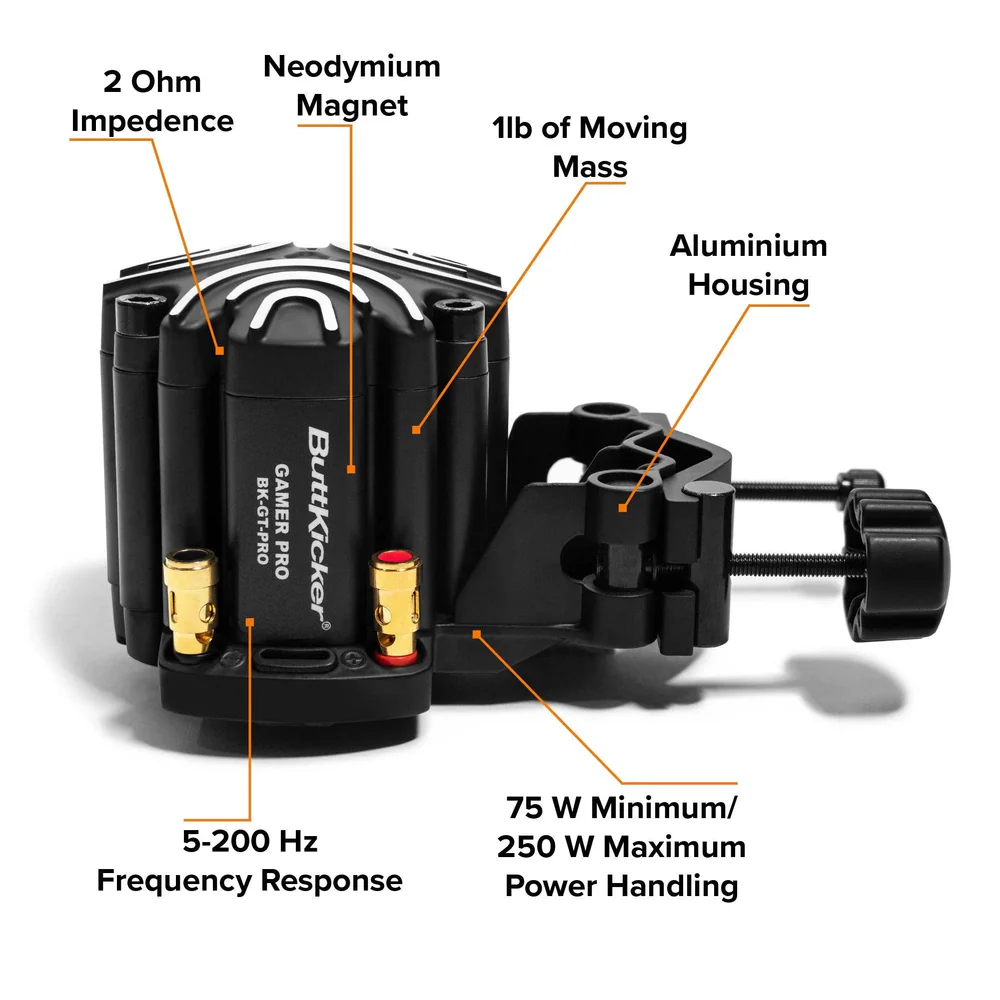
The ButtKicker Gamer PRO is a tactile feedback device that turns low-frequency audio signals into physical vibrations. Instead of only hearing the sound of an engine or an impact, you can feel the effect through a compatible seat or mounting system.
Unlike a standard speaker, which produces sound that travels through the air, a tactile transducer transfers vibrations into the structure to which it is attached. This allows the user to experience physical feedback while playing supported games.
For sim racing, this can make a real difference. You may feel the engine running, the car moving over uneven surfaces, or the force of a collision when the game and audio setup provide the right signals.
Furthermore, tactile feedback can add depth to your existing equipment without requiring you to replace your steering wheel, pedals, or cockpit.
How Does a Tactile Feedback System Work?
A tactile feedback system works by converting suitable audio signals into vibrations. These vibrations travel through a mounting point and into your seat or cockpit, where you can feel them.
The result depends on several factors, including the game, audio settings, mounting method, and strength of the signal.
When properly configured, the system can help you distinguish different effects during gameplay. For instance, engine noise may create a steady vibration, while a sudden impact can produce a short, stronger sensation.
This makes tactile feedback a useful option for gamers who want more than visual and audio immersion.
Key Features of the ButtKicker Gamer PRO
When choosing a tactile feedback device, it is important to understand what it adds to your setup. The ButtKicker Gamer PRO focuses on physical feedback, making it a useful option for sim racers who want to improve the feel of their simulator.
Powerful Tactile Feedback
The main purpose of this device is to deliver physical sensations through your seat or compatible mounting structure.
Instead of depending only on your speakers or headset, you can feel selected low-frequency effects as you play. This can make engine sounds, road effects, and other supported signals more noticeable.
Moreover, tactile feedback can help create a more engaging driving environment, especially when paired with a suitable sim racing game.
Enhanced Gaming Immersion
Immersion is an important part of a good simulator. The more connected you feel to the virtual environment, the more enjoyable your sessions can become.
The ButtKicker Gamer PRO adds a physical layer to the experience. As your game produces suitable audio signals, the device transfers those signals into vibrations that you can feel.
Consequently, racing can feel more dynamic, while supported flight and other simulation games can benefit from added physical feedback.
Compact Design for Gaming Setups
A tactile feedback system can fit into many dedicated gaming environments when the mounting arrangement is suitable.
This makes the device worth considering for home sim racing rigs, cockpit upgrades, and other compatible seating setups.
However, you should always check the mounting requirements before purchasing. The design of your seat, frame, and mounting points can affect installation and performance.
Adjustable Feedback Experience
Your preferred level of vibration may depend on the game you play and the type of experience you want.
Some users may prefer strong engine feedback, while others may want more subtle vibrations that do not distract from steering and braking.
With suitable controls and software settings, you can adjust the overall experience to suit your preferences. The exact adjustment options depend on the amplifier, connection method, and compatible software used with the system.
ButtKicker Gamer PRO for Sim Racing
Sim racing relies on a combination of steering control, pedal response, visual information, and sound. However, physical feedback can add another useful layer to this experience.
The ButtKicker Gamer PRO can help bring selected in-game effects into your seat, making your simulator feel more connected to the action on screen.
Feel Engine Vibrations
Engine sounds are an important part of racing immersion. With suitable audio signals, a tactile feedback device can transfer low-frequency engine effects into your seat.
This can help you feel the character of a car while driving. For example, a powerful racing car may produce a different sensation from a smaller road car, depending on the game’s audio output and your settings.
In addition, engine feedback can make driving more engaging during long practice sessions.
Experience Road Surface Changes
Road surfaces can have a major effect on the feel of a racing game.
With compatible signals, tactile feedback can help you experience vibrations associated with kerbs, rough surfaces, and other changes in the track environment.
This adds a physical sensation to what you see on your monitor. As a result, driving around a circuit can feel more involving.
Keep in mind that the device does not directly measure the track surface. It responds to the signals it receives, so the quality of the effect depends on the game and configuration.
Add Feedback During Gear Changes
Gear changes are another part of the driving experience that can benefit from tactile effects.
Depending on the game and audio configuration, shifts may produce noticeable changes in vibration. These effects can add to the sensation of operating a race car.
When combined with a compatible steering wheel and pedal set, this can help make your simulator feel more complete.
Feel Impacts and Other Racing Effects
Racing games often include low-frequency sounds linked to impacts, track limits, and other events.
A suitable tactile feedback setup can turn some of these signals into physical sensations. This adds another dimension to the experience, particularly when racing closely with other cars.
The effects you feel will depend on the signals supplied by the game and how your system is configured.
Benefits of Adding a ButtKicker to Your Racing Cockpit
A well-designed sim racing cockpit gives you a stable place to drive. However, adding tactile feedback can help you get more from your existing equipment.
Here are some benefits to consider.
- Greater immersion: Feel selected in-game effects through your seat instead of relying on sound and visuals alone.
- More engaging racing sessions: Add physical sensations to practice, time trials, and competitive races.
- A more complete simulator: Combine tactile feedback with your steering wheel, pedals, and display setup.
- Flexible setup options: Explore suitable mounting arrangements for compatible seats and cockpit frames.
- Support for different games: Enjoy tactile effects in compatible racing, flight, and other simulation titles.
- A more personal experience: Adjust available settings to suit your preferred feedback strength.
These benefits make tactile feedback worth considering if you want to upgrade your simulator without rebuilding your entire setup.
ButtKicker Gamer PRO for PC Sim Racing
PC sim racing offers many ways to customize your gaming environment. Depending on the title, drivers, and available software, you may be able to adjust audio output and configure additional feedback features.
The ButtKicker Gamer PRO can be part of this process when the required connections and system components are compatible.
Compatibility With Sim Racing Games
Before purchasing, check whether your preferred games can provide suitable signals for the device.
Some setups use game audio to produce tactile effects, while others may use dedicated software to generate or control specific feedback signals.
The supported experience can vary between titles. Therefore, it is important to confirm the requirements for your chosen game and operating system before ordering.
Pairing With a Direct Drive Wheel
A direct drive steering wheel provides force feedback through the wheel itself. A tactile transducer adds physical sensations through your seat or cockpit.
These systems perform different roles, so they can complement each other when properly configured.
For example, the steering wheel may communicate steering forces, while the tactile device adds vibrations linked to engine sounds or other supported effects.
Together, they can create a more involved driving experience without requiring either device to replace the other.
Combining Tactile Feedback With Racing Pedals
Pedals are another key part of a sim racing setup. A good pedal set helps you control acceleration, braking, and clutch input where applicable.
Tactile feedback adds a separate physical element to the cockpit. Depending on your hardware and software, you may be able to combine the seat-mounted system with other compatible feedback products.
Before connecting several devices, check their individual requirements to avoid conflicts or unexpected behaviour.
ButtKicker Gamer PRO and Flight Simulation
Although sim racing is a natural use for tactile feedback, flight simulation can also benefit from physical effects.
Aircraft engines, vibration, and other low-frequency signals can contribute to the feeling of being inside a virtual cockpit.
When the game and audio setup provide suitable signals, a tactile device can transfer some of these effects through a compatible seat.
This may be appealing to flight simulation fans who want to add more physical depth to their setup.
However, the results depend on the aircraft simulation, audio output, and system configuration. Not every in-game event will produce a distinct vibration.
Setting Up Your ButtKicker Gamer PRO
Correct installation is important for a good tactile feedback experience. A suitable mounting position can help transfer vibrations effectively while reducing unwanted movement or noise.
Before you begin, review the manufacturer’s instructions for your exact product version and any required accessories.
Check Your Seat and Cockpit
Start by checking the design of your racing seat or gaming chair.
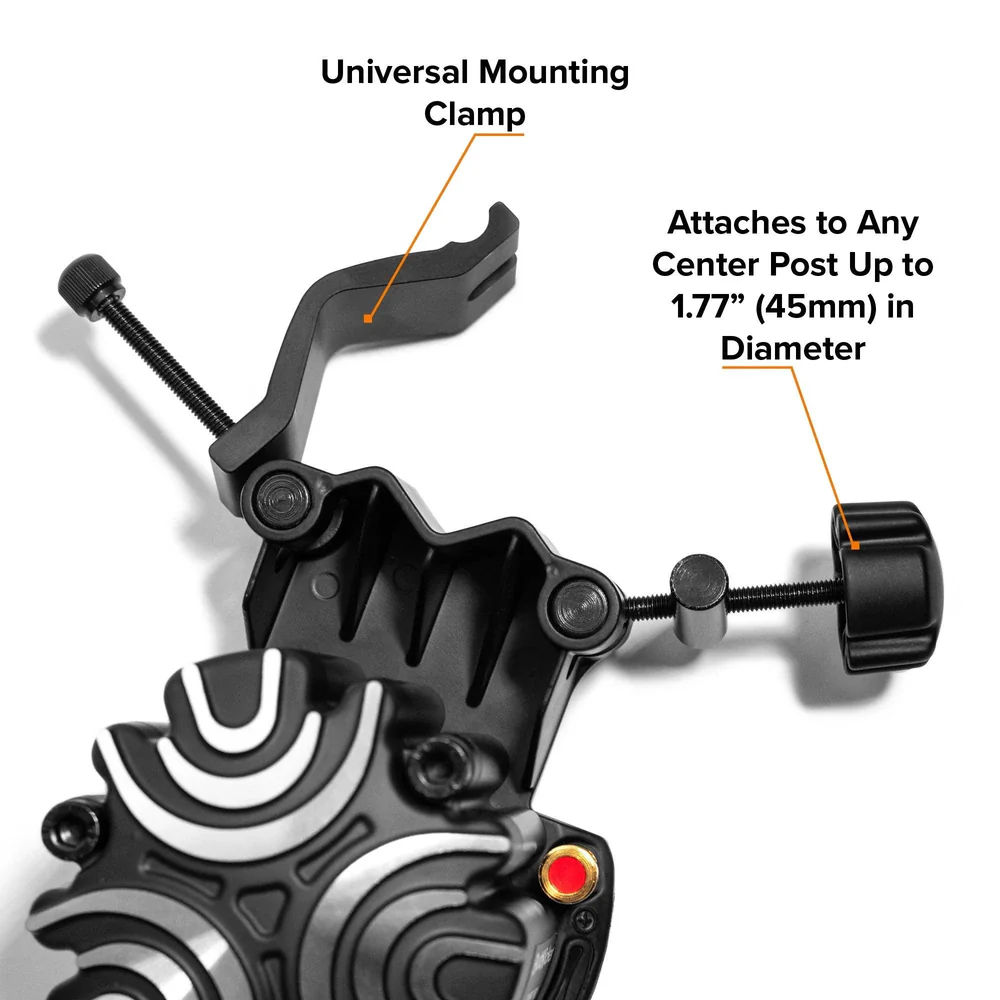
You need a suitable mounting point that can support the device and transfer its vibrations. Some seats and cockpit frames may require a compatible bracket or additional mounting hardware.
Also, consider the construction of your rig. A rigid frame can help direct vibrations through the intended structure, while loose parts may create unwanted rattling.
Review the Required Connections
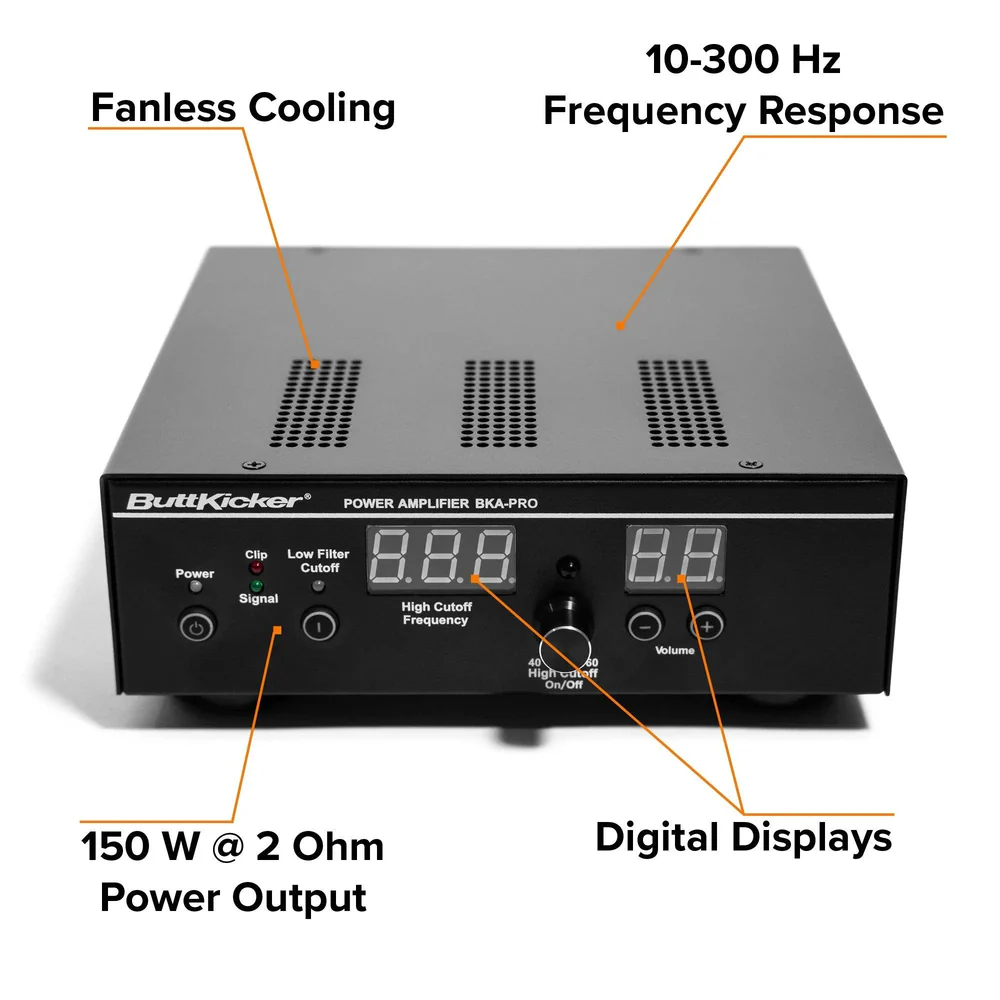
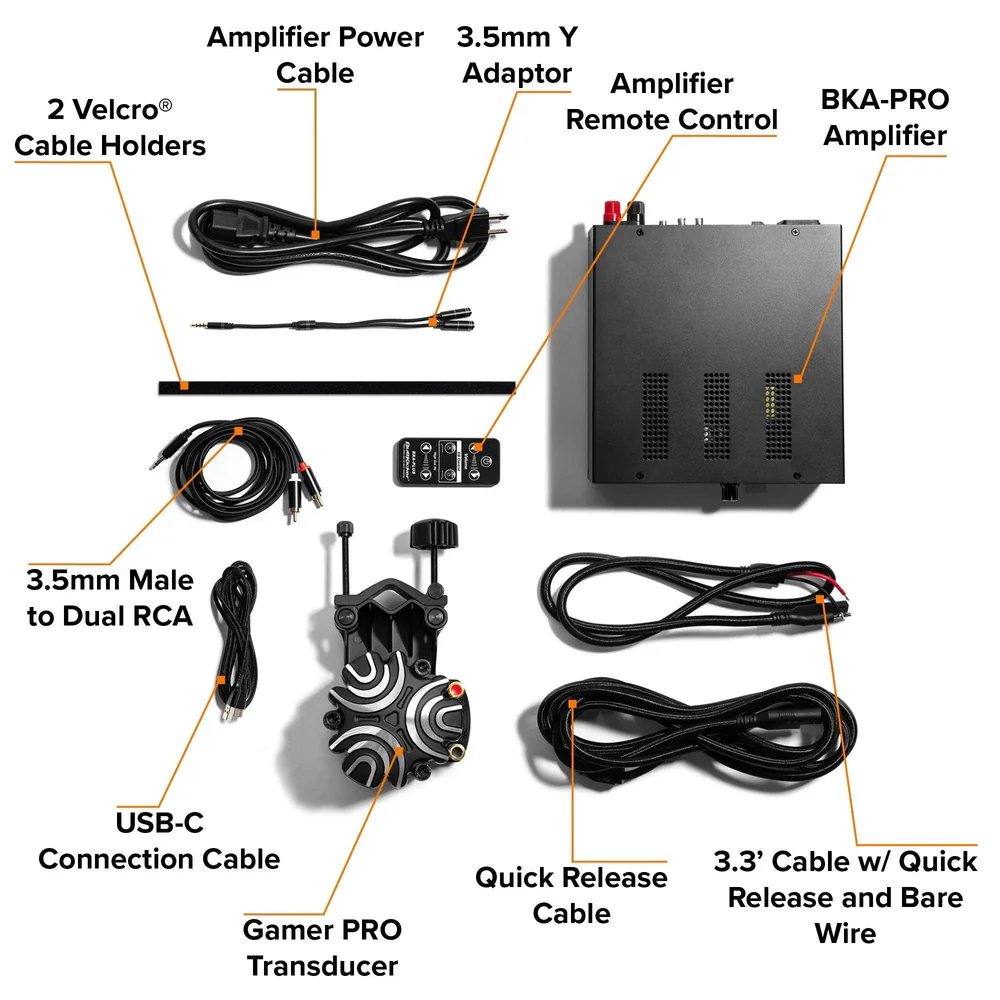
The complete setup may require an amplifier, suitable cables, and a compatible audio source.
The exact requirements depend on the version you purchase and the components included in the package. Check the product listing carefully so you understand what comes with the device and what you may need to buy separately.
This step can help you avoid delays during installation.
Configure Your Audio Settings
Once the hardware is installed, review the audio settings for your game and computer.
Make sure the device receives an appropriate signal. If your setup uses separate software or an audio output dedicated to tactile feedback, follow the relevant configuration instructions.
Start with moderate levels and increase them gradually until you find a comfortable setting.
Test the System Before Racing
Run a short test before beginning a long session.
Listen for unwanted rattles, check that the mounting points remain secure, and confirm that the vibrations feel controlled rather than overwhelming.
If you notice excessive noise or movement, review the mounting arrangement and settings before continuing.
How to Get the Best Performance
Getting a good result from tactile feedback is about more than choosing a powerful device. Installation, tuning, and the quality of the input signal all matter.
Choose the Right Feedback Level
Too much vibration can become distracting. On the other hand, feedback that is too weak may be difficult to notice.
Start with a low setting and make small changes until you find the right balance. The goal is to add useful physical effects without making your racing experience uncomfortable.
Reduce Unwanted Rattling
Loose screws, panels, brackets, or other cockpit parts can create noise when the system vibrates.
Check the frame and mounting points before use. Tighten hardware according to the manufacturer’s instructions and make sure the device is securely attached.
Where appropriate, compatible isolation materials may help reduce the transfer of unwanted vibration to nearby furniture or flooring.
Always follow the manufacturer’s installation and safety guidance.
Keep Your Setup Well Maintained
Regular checks can help keep your equipment in good working order.
Inspect the mounting hardware, cables, and connections from time to time. Also, keep the surrounding area clear so that cables do not become trapped or pulled during use.
If you notice unusual noise, excessive heat, or changes in performance, stop using the system and check the manufacturer’s troubleshooting guidance.
Is the ButtKicker Gamer PRO Worth It?
Whether this device is worth buying depends on what you want from your simulator.
If you already have a steering wheel, pedals, and a stable cockpit, tactile feedback may be a useful next upgrade. It adds a physical element that conventional audio and visual equipment cannot provide on their own.
However, it may not be the first accessory you need if your current setup lacks essential equipment.
Who Should Consider This Device?
The ButtKicker Gamer PRO may suit:
- Sim racers who want more physical feedback from compatible games.
- PC gamers building a dedicated racing simulator.
- Flight simulation fans seeking additional immersion.
- Experienced racers who want to expand an existing cockpit.
- Gaming enthusiasts who enjoy adjusting and improving their setup.
If you enjoy experimenting with your simulator, tactile feedback can offer another way to personalize your experience.
Who May Not Need It?
This device may be less suitable for someone who wants a basic gaming setup or prefers a completely quiet environment.
It also requires careful attention to compatibility, mounting, and configuration. Therefore, buyers who want a simple plug-and-play experience should confirm the installation process before making a purchase.
Considering these points can help you decide whether tactile feedback is the right next step for your setup.
ButtKicker Gamer PRO vs. Standard Bass Shakers
A standard bass shaker and the ButtKicker Gamer PRO share a similar purpose: they convert suitable signals into physical vibrations.
However, the exact experience depends on the hardware design, amplifier, power requirements, and mounting arrangement.
Understanding the Main Differences
A basic bass shaker may be suitable for users who want to explore tactile feedback at a lower cost. However, the complete setup may require separate components and additional configuration.
The ButtKicker Gamer PRO is a dedicated product in the tactile feedback category. Buyers should review its specifications and package contents to understand what is included and what additional hardware may be required.
Neither option automatically guarantees better results in every cockpit. The quality of the installation and the signals supplied by your games can make a significant difference.
Which Option Is Right for Your Setup?
Consider your budget, existing hardware, and willingness to configure the system.
If you prefer a dedicated product with clearly documented installation requirements, the Gamer PRO may be worth considering.
If you enjoy building a custom setup from separate components, a standard bass shaker may also be an option.
Before deciding, compare the supported connections, amplifier requirements, mounting options, and warranty terms.
Building a Complete Sim Racing Setup
Tactile feedback is only one part of a good racing simulator. To get the most from your equipment, consider how each component works with the rest of your setup.
Steering Wheels and Wheelbases
Your steering wheel and wheelbase help you control the car and feel force feedback from the game.
A direct drive wheelbase can provide detailed steering forces, while a suitable wheel gives you access to controls that match your preferred racing style.
When combined with tactile feedback, these components can provide different types of information during a race.
Racing Pedals
Pedals allow you to control braking, acceleration, and clutch input.
A quality pedal set can improve consistency and control, especially when you spend time practising braking points and throttle application.
Choose pedals that suit your experience level, budget, and available cockpit space.
Racing Cockpits and Seats
A stable cockpit helps keep your equipment in position during demanding sessions.
It can also provide suitable mounting points for compatible accessories, including tactile feedback devices.
Before adding a new component, check the available space and mounting requirements. A well-planned cockpit can make installation easier and help reduce unwanted movement.
Displays and Audio Equipment
A clear display helps you follow the track, while suitable audio equipment lets you hear engine sounds and other game effects.
These components work alongside tactile feedback rather than replacing it.
For the best overall experience, choose equipment that fits your space, budget, and preferred games.
Explore compatible steering wheels, wheelbases, pedals, cockpits, and simulator accessories when planning your next upgrade.
Quality, Reliability, and Product Checks
Buying simulation equipment is an investment, so it is worth checking the product details before placing an order.
Review the official specifications, included accessories, installation requirements, and warranty information for the exact version you intend to purchase.
Where available, read feedback from verified buyers and look for information about long-term use, mounting, and compatibility.
What to Check Before Buying
Use this checklist to make a more informed decision:
- Confirm that the product is the correct ButtKicker Gamer PRO model.
- Check the required amplifier and connection method.
- Review the mounting requirements for your seat or cockpit.
- Confirm compatibility with your preferred games and operating system.
- Check whether cables, brackets, and other accessories are included.
- Review the seller’s return policy and warranty terms.
- Make sure the product fits your budget and intended use.
These simple steps can help you avoid buying incompatible equipment.
Buy From a Reliable Seller
Choose a seller that provides clear product information and support.
A reliable product listing should explain what is included, what additional components may be needed, and which compatibility details you should check.
If you have questions about your setup, ask for clarification before ordering. This can help you choose the right product and reduce the risk of installation problems.
Shipping, Installation Safety, and Compliance
Before ordering the ButtKicker Gamer PRO, review the seller’s shipping information, delivery estimates, return conditions, and applicable warranty terms.
Delivery times may vary according to your location, stock availability, and the shipping service selected.
If your order is being shipped internationally, check whether import duties, taxes, or other fees may apply.
Safe Installation and Use
Install the device according to the manufacturer’s instructions.
Use suitable mounting hardware, keep cables secure, and avoid placing the unit where it could interfere with moving parts or normal seat adjustment.
Do not exceed the product’s stated operating limits. Also, avoid making electrical changes unless they are approved by the manufacturer.
If the system produces unusual noise, excessive heat, or unexpected movement, switch it off and inspect the installation before using it again.
Check Compatibility Before Ordering
Product versions and package contents can vary between sellers.
Therefore, review the listing carefully and confirm that the device works with your intended setup. If you need additional mounting parts or an amplifier, account for those costs when planning your purchase.
A few minutes spent checking the details can help you enjoy a smoother installation.
Frequently Asked Questions About the ButtKicker Gamer PRO
1. What Does the ButtKicker Gamer PRO Do?
The ButtKicker Gamer PRO converts suitable low-frequency audio signals into physical vibrations. When attached to a compatible seat or structure, it allows you to feel selected game effects rather than only hearing them.
2. Is the ButtKicker Gamer PRO Good for Sim Racing?
It can be a useful addition to a sim racing setup. It adds tactile feedback that can make engine sounds, track effects, and other supported signals feel more physical.
The results depend on the game, audio settings, mounting arrangement, and other system components.
3. Can I Use the ButtKicker Gamer PRO With a Gaming Chair?
Potentially, yes, but compatibility depends on the chair’s construction and the available mounting options.
Check the manufacturer’s requirements and confirm that your chair can support the device safely. Some setups may need a compatible bracket or a different mounting arrangement.
4. Does the ButtKicker Gamer PRO Replace Force Feedback?
No. Tactile feedback and steering force feedback serve different purposes.
A wheelbase communicates steering forces through the wheel, while a tactile device transfers vibrations through your seat or mounting structure.
Using both can provide a more complete simulation experience when the hardware and software are compatible.
5. Do I Need an Amplifier?
The required amplification depends on the product version and the components included in your package.
Check the official specifications and seller’s listing before ordering. This will help you confirm whether an amplifier is included or must be purchased separately.
6. Can I Use It With Different Racing Games?
It may work with different games when they provide suitable audio signals and the system is configured correctly.
However, the quality and type of feedback can vary between titles. Confirm compatibility with your preferred games before purchasing.
7. Will It Make My Setup Noisy?
The device produces physical vibrations, and some vibration may transfer to the cockpit, floor, or nearby furniture.
Secure mounting, sensible settings, and a suitable installation can help reduce unwanted rattling. However, the amount of noise depends on your equipment and environment.
8. Is the ButtKicker Gamer PRO Suitable for Beginners?
It can suit beginners who want to expand their sim racing setup, provided they understand the installation and compatibility requirements.
If you are new to simulation equipment, review the instructions and package contents before buying. You may also want to establish a stable wheel, pedal, and cockpit setup first.
9. What Should I Check Before Purchasing?
Confirm the model, mounting requirements, required connections, included accessories, compatibility, warranty, and return policy.
These details will help you determine whether the product fits your current equipment.
10. Can Tactile Feedback Improve My Racing Skills?
Tactile feedback can make certain game effects easier to feel, depending on how your setup is configured.
However, it does not guarantee faster lap times or better results. Driving skill still depends on practice, consistency, race knowledge, and control of your equipment.
Upgrade Your Simulator With the ButtKicker Gamer PRO
A great sim racing setup is about more than steering and speed. It is also about how connected you feel to the virtual car and track.
The ButtKicker Gamer PRO adds physical feedback to compatible gaming setups, helping you experience selected low-frequency effects through your seat. From engine vibrations to track-related sensations, it can bring another layer of immersion to your favourite simulations.
When combined with a suitable wheelbase, responsive pedals, and a stable cockpit, tactile feedback can help create a more engaging racing environment.
Before purchasing, check compatibility, mounting requirements, and package contents to make sure the device suits your setup.
Ready to enhance your sim racing experience? Explore the ButtKicker Gamer PRO and consider whether tactile feedback is the right upgrade for your cockpit. Choose compatible equipment, configure your system carefully, and enjoy a more immersive way to experience virtual racing.
Conclusion
The ButtKicker Gamer PRO is an option for sim racers and simulation fans who want to add physical feedback to their gaming environment.
Its main benefit is the ability to turn suitable audio signals into vibrations that you can feel through a compatible seat or mounting structure. This can add depth to supported racing and flight simulation experiences.
However, compatibility, installation, and correct settings are important. Take time to review the product specifications and ensure that your equipment meets the requirements before ordering.
With the right setup, tactile feedback can become a valuable part of your simulator, helping you enjoy a more engaging and personalised gaming experience.




Reviews
There are no reviews yet.