



Description
Freestanding Triple TV Stand (Up to 65″) – Create a Powerful Multi-Screen Setup
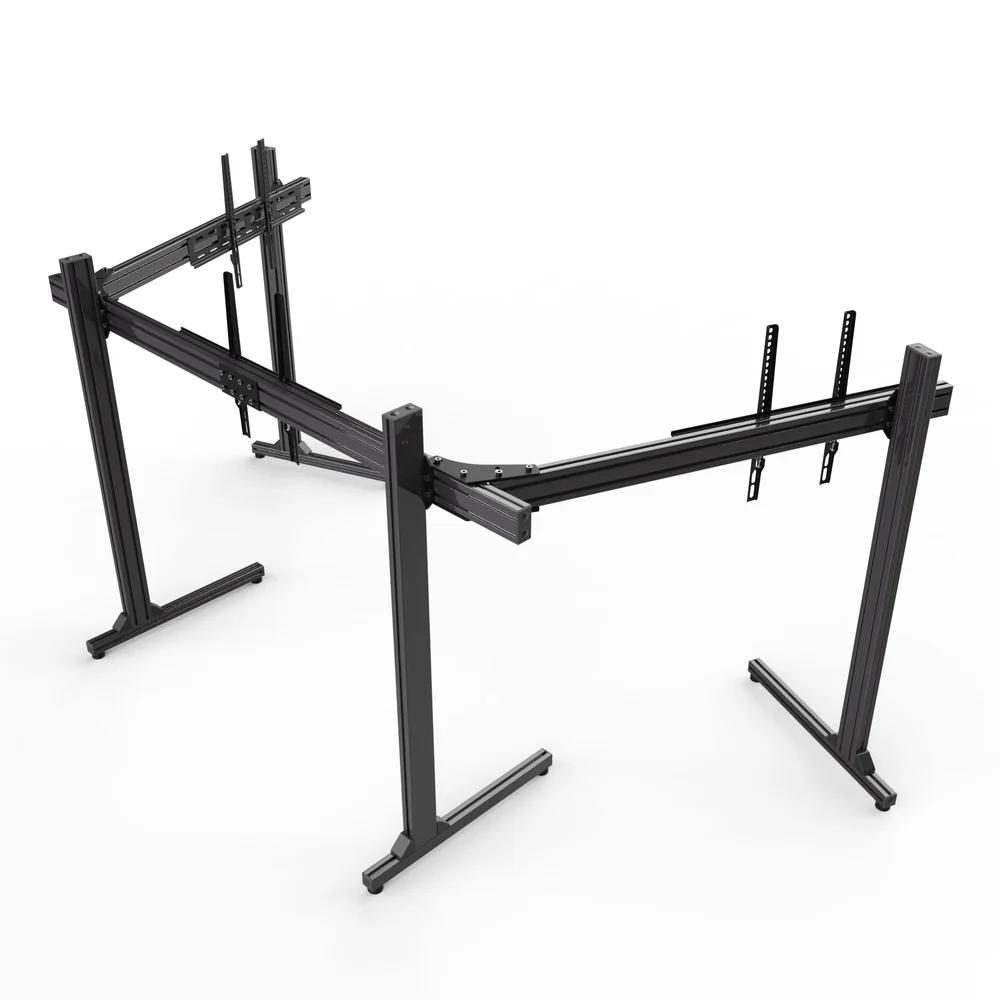
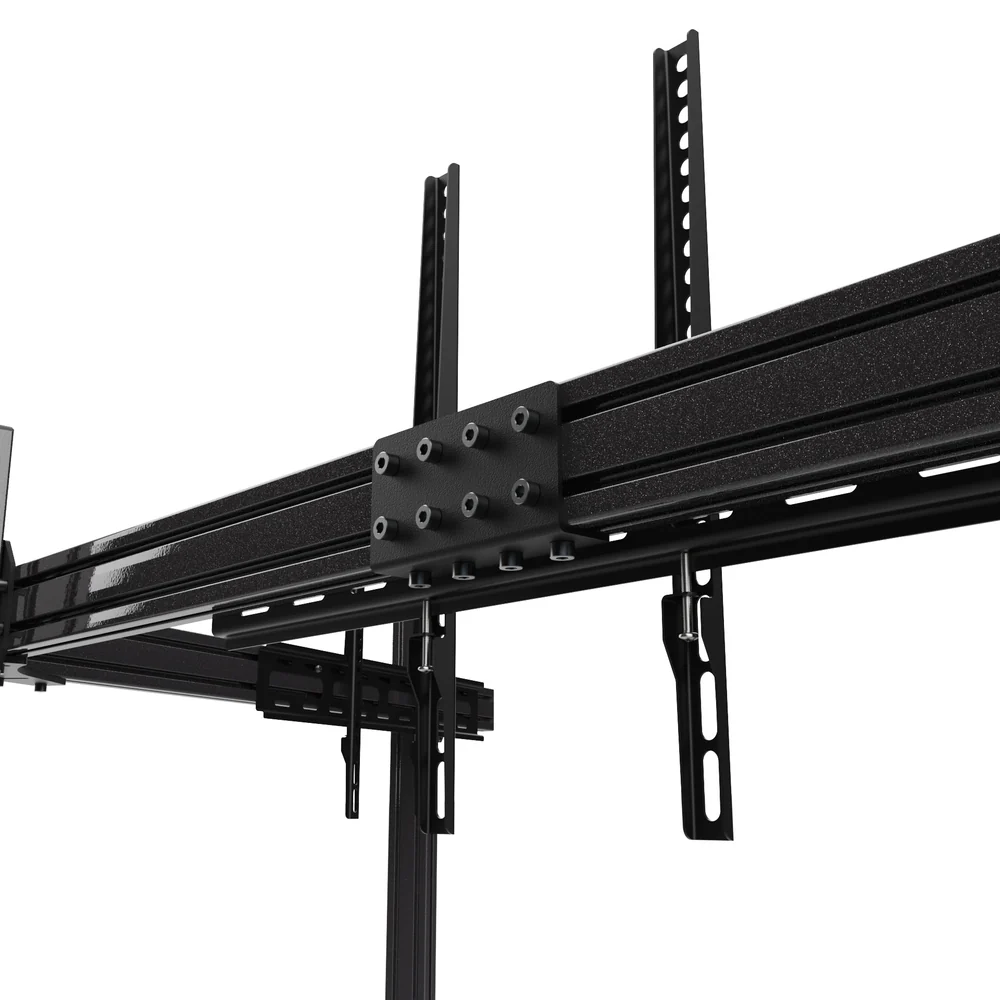
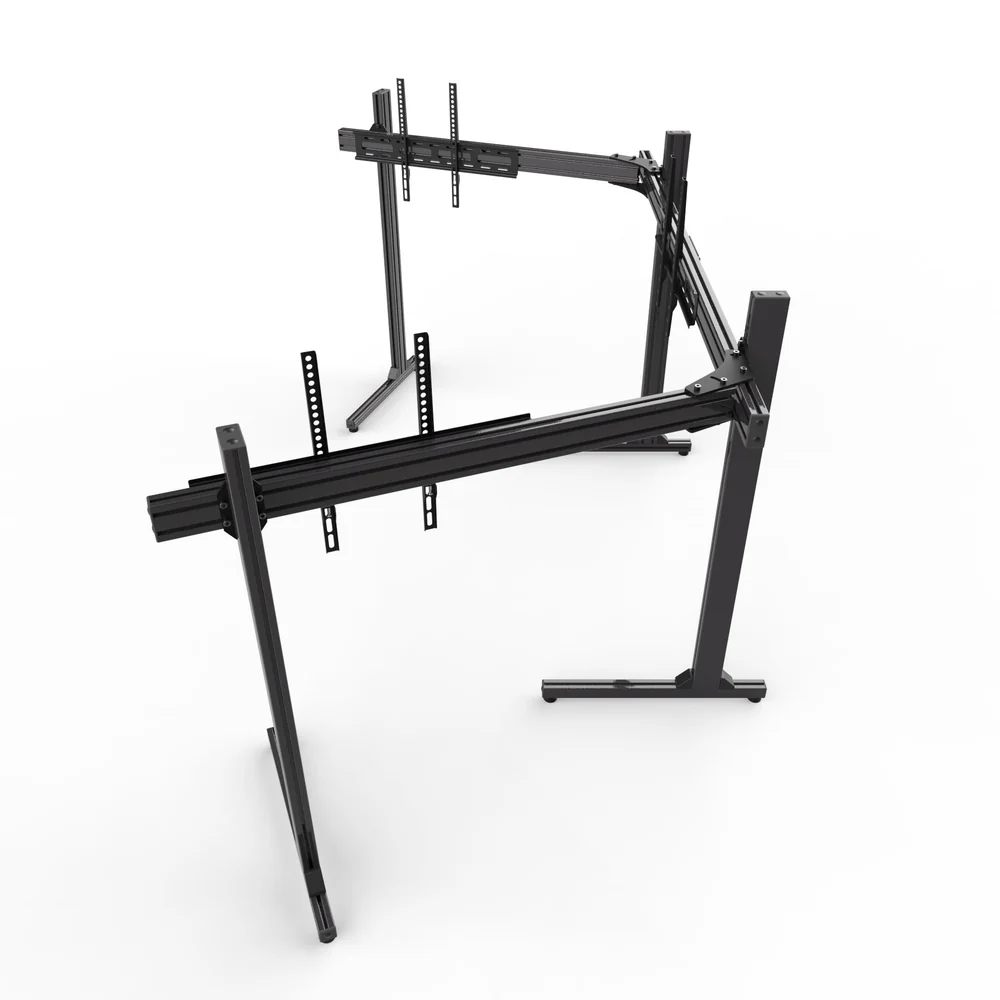
Upgrade your viewing space with a Freestanding Triple TV Stand (Up to 65″) designed for modern entertainment, gaming, work, and multi-screen setups. If one screen is not enough, this practical stand gives you the option to arrange three displays in one organized setup.
A triple TV stand can make a big difference when you want more screen space without filling your room with several separate TV units. Instead, you can create a clean and structured display that keeps your screens together.
Whether you are building a home entertainment area, gaming station, sports viewing setup, or professional display space, a freestanding triple TV stand offers a flexible way to position multiple screens.
With a smart freestanding design, there is also no need to depend on a traditional TV cabinet for support. The stand can help create a more open look while keeping your screens positioned at a useful viewing height.
Freestanding Triple TV Stand for Modern Spaces
A Freestanding Triple TV Stand (Up to 65″) is a practical choice for anyone who wants to use three TVs or displays in the same area. Rather than placing each screen on a different surface, a single multi-screen TV stand can bring the setup together.
This makes the stand especially useful in rooms where floor space and organization matter. It can also help give your setup a more professional appearance.
For example, you can use the three screens for gaming, sports, movies, business presentations, digital signage, or monitoring several sources at once.
The freestanding design also gives you more freedom when planning your room. You are not limited to a wall-mounted arrangement, so you can position your screens based on your space and viewing needs.
Triple TV Stand for Three-Screen Viewing
A Freestanding Triple TV Stand Up to 65 is ideal when three screens are part of your setup. Instead of treating every display as a separate unit, the stand creates one central structure for your screens.
This can be useful for several types of users.
Gaming and Sim Racing
Gamers can use a triple screen setup to create a wider field of view. Racing games, flight simulators, driving simulators, and other titles can benefit from having multiple displays working together.
A well-planned three-screen arrangement can make your gaming area feel more immersive. It can also give you additional space for game information, maps, dashboards, or other content.
If you are building a dedicated gaming room, a Freestanding Triple TV Stand Up to 65 can help keep the displays organized while reducing the need for several separate stands.
Sports and Entertainment
Sports fans can also benefit from a multi-screen setup. Three displays allow you to follow different games, channels, or information at the same time.
For movie and entertainment areas, multiple screens can also create an impressive visual display. The setup can be tailored to the room and the way you want to use your screens.
Work and Professional Use
A three-screen display can be useful outside the home as well. Businesses, offices, showrooms, event spaces, and reception areas can use multiple displays to present information.
You could display dashboards, presentations, advertisements, schedules, or other visual content across several screens.
This makes a TV display stand more than a simple home entertainment accessory. It can become part of a practical display solution for many environments.
Freestanding Triple TV Stand Up to 65 Inches
The TV stand up to 65 inches size range makes this type of stand suitable for many popular TV and display sizes. However, screen size alone should not be the only factor you check before installation.
Always check your TV’s weight, mounting pattern, dimensions, and compatibility with the stand before purchase or installation.
A screen may be within the stated size range but still require additional compatibility checks. For that reason, compare your TV specifications with the product specifications before setting up your display.
This simple step helps you choose the right solution and plan your setup with greater confidence.
Freestanding TV Mount Design
A freestanding TV mount provides an alternative to traditional wall mounting. Instead of attaching your displays directly to a wall, the stand creates a dedicated support structure.
This can be helpful if you are renting a property, changing your room layout often, or simply prefer not to drill into your wall.
It also gives you more freedom when designing your entertainment area. You can place the stand where it works best for your room and adjust your overall layout around it.
The result is a cleaner approach to managing several displays in one location.
Why Choose a Multi-Screen TV Stand?
A multi-screen TV stand is built around one simple idea: bring several screens together in a more organized setup.
Using separate TV stands for three displays can take up more space and may create a cluttered appearance. A single structure can help create a more consistent look.
Here are some of the main benefits:
- Supports a three-screen display concept
- Helps organize multiple TVs in one area
- Creates a clean and modern appearance
- Suitable for entertainment and gaming setups
- Useful for sports viewing
- Can work well in offices and commercial spaces
- Offers an alternative to wall mounting
- Helps make better use of available floor space
- Provides a central structure for multiple displays
- Can support a more professional-looking setup
These benefits make a Freestanding Triple TV Stand (Up to 65″) a useful choice for users who want more than a basic single-screen arrangement.
Adjustable TV Stand for Flexible Setup
Flexibility is important when working with multiple screens. An adjustable TV stand can make it easier to create a viewing arrangement that suits your room and your preferred screen position.
When planning your setup, think about where you will normally sit or stand. The screen position should provide a comfortable viewing experience without forcing you to look too high or too low.
You should also consider the distance between your seating position and the screens.
A three-screen arrangement needs careful planning because all displays should work together visually. Taking time to position the screens correctly can make the finished setup look cleaner and feel easier to use.
Three TV Stand for Gaming
A three TV stand can be an excellent addition to a dedicated gaming setup.
For racing games in particular, three displays can provide a broad view of the track. This can make it easier to see what is happening around your car while adding to the overall sense of immersion.
The stand can also help keep the three displays at a consistent height. This is important when you want your screens to look like one connected viewing area.
For a sim racing setup, the stand can be positioned behind or around your cockpit, depending on your room and equipment layout.
Before installation, make sure the stand, displays, gaming equipment, and surrounding furniture have enough clearance.
Triple Monitor TV Stand for Sim Racing
Sim racing is one of the most popular uses for a triple monitor TV stand. A three-screen setup can provide a much wider view than a single display.
This wider view can be useful when driving because you can see more of the track and surrounding environment.
However, the stand should be considered alongside the rest of your racing setup. Your cockpit position, wheelbase, pedals, seat height, and screen distance all affect how comfortable the final arrangement will be.
A properly planned setup can create a more organized racing area while keeping your displays securely positioned within the overall layout.
If you are upgrading from one screen to three, a dedicated stand can also make the transition easier because the displays can be planned as one complete system.
A Cleaner Alternative to Multiple TV Stands
Using three separate stands may work, but it can create an uneven appearance. Each screen may sit at a slightly different height or position.
A dedicated Freestanding Triple TV Stand (Up to 65″) offers a more unified solution.
Instead of arranging three individual units, you can create one central display area. This can make your room look more organized and reduce visual clutter.
The stand can also help you plan cable management around one main structure instead of three separate locations.
Good cable management is especially important when several TVs or displays are being used. Keep cables organized and away from areas where people walk or where they could become caught.
Where Can You Use a Freestanding Triple TV Stand?
The versatility of a freestanding design means it can suit many different spaces.
Home Entertainment Room
Create a dedicated viewing area for movies, television, sports, and streaming. Three displays can make the room more flexible when several people want to watch different content.
Gaming Room
Build a wide gaming display with multiple screens. This can be especially useful for racing and simulation games.
Office
Use multiple displays for dashboards, data, presentations, communication tools, or other work content.
Showroom
A business can use several screens to present products, promotions, videos, or other visual information.
Event and Display Areas
Multiple screens can also be useful for events where information needs to remain visible from different positions.
Because the stand is freestanding, you can plan its position around the needs of the space.
Important Compatibility Checks
Before buying or installing your stand, take a few minutes to check compatibility.
First, confirm that your TVs are within the supported screen size range. The TV stand up to 65 inches specification is an important starting point, but it should not replace checking the full product specifications.
Next, check the weight of each TV. Your displays should remain within the supported weight limit of the stand.
You should also check the mounting pattern on the back of each TV. VESA compatibility is commonly used for TV mounting, but the exact pattern can differ between models.
Finally, check the available space in your room. Three screens require enough width and depth for a comfortable setup.
These checks can help you avoid compatibility problems and make installation easier.
Build an Organized Entertainment Setup
A good display setup is about more than having larger screens. Organization also matters.
A Freestanding Triple TV Stand (Up to 65″) can help bring your displays into one coordinated area. This makes it easier to plan your seating, gaming equipment, furniture, and cables around the screens.
For a modern room, a well-organized setup can also look much better than several unrelated TV stands.
Keep the surrounding area clear and make sure the stand has enough room around it. Avoid placing heavy objects against the stand unless the product instructions specifically allow it.
Easy Planning for Your Three-Screen Setup
Before you begin, measure your available space.
Consider the width of the area where the stand will sit. Then measure the size of your TVs and compare those measurements with the stand’s specifications.
Next, decide how you want the displays arranged. Some users prefer screens positioned in a straight line, while others may want a more angled arrangement for gaming or simulation.
Your preferred layout will depend on how the displays are used.
For gaming, your main viewing position should normally be centered around the primary display. For business or information use, you may prefer a layout that allows several screens to remain visible at once.
Quality and Reliability Matter
When purchasing a TV stand, quality should always be part of the decision.
A multi-screen setup places more importance on proper installation and compatibility because several displays are being supported within the same arrangement.
For this reason, always follow the manufacturer’s installation instructions. Use the correct hardware and make sure every connection is secure before placing your TVs on the stand.
Do not exceed the stated weight or size limits.
If you are unsure whether your television is compatible, check its specifications before installation rather than guessing.
This approach helps you build your setup with greater confidence.
Safe TV Stand Installation
Safety should always come first when setting up a freestanding TV mount.
Place the stand on a suitable, stable surface. Make sure the area is clear and that the stand is positioned where it will not create an unnecessary obstruction.
During installation, check every connection carefully.
Once the TVs are installed, inspect the setup before use. Make sure the displays are properly supported and that the stand does not show signs of instability.
Keep children and pets away from the installation area while you are assembling the product.
Also, keep power cables and other wires organized so they do not become a trip hazard.
Following the supplied instructions is one of the simplest ways to create a safer and more reliable setup.
Designed for a Better Viewing Experience
A three-screen display can change the way you use your entertainment or gaming space.
Instead of switching between different windows or screens, you can have more information visible at the same time.
For gamers, this can mean a wider view. For sports fans, it can mean following several events. For businesses, it can mean displaying more information in one location.
The Freestanding Triple TV Stand (Up to 65″) provides the foundation for this type of setup while helping you keep your displays organized.
A Practical Choice for Multi-Screen Users
If you already use multiple TVs or plan to build a three-screen setup, a dedicated stand can make the overall arrangement easier to manage.
Rather than purchasing separate supports for every display, a triple TV stand is designed around the idea of bringing the screens together.
It can also help your room look more intentional. Every screen becomes part of one larger display rather than looking like an independent installation.
This makes the stand suitable for both practical and visual reasons.
Shop with Confidence
Choosing the right TV stand starts with understanding your equipment.
Check the screen size, weight, mounting pattern, dimensions, and available space before ordering. These simple checks can help you select a suitable solution for your displays.
When you are ready to improve your multi-screen setup, choose a stand that matches your needs and follow the installation instructions carefully.
A secure checkout and clear product information can also make the buying process easier, giving you the confidence to make the right choice for your setup.
Upgrade Your Three-Screen Setup Today
Ready to create a cleaner and more flexible display area?
The Freestanding Triple TV Stand (Up to 65″) is a practical solution for users who want to bring three displays together in one organized setup.
Whether you are upgrading a gaming room, creating a home entertainment area, building a sports viewing station, or setting up a professional display, this stand gives you a strong starting point for a multi-screen arrangement.
Before ordering, check your TV specifications and make sure they match the stand’s requirements.
Once everything is confirmed, you can move forward with your setup and enjoy a more organized way to use multiple screens.
Final Thoughts
A multi-screen setup can offer more flexibility, more viewing options, and a better way to organize your entertainment or gaming space.
However, three displays need the right support. A dedicated Freestanding Triple TV Stand (Up to 65″) can help bring your screens together while creating a cleaner and more structured appearance.
From gaming and sim racing to sports, entertainment, offices, and commercial displays, a triple TV stand can be used in many different environments.
Choose the right screen sizes, confirm compatibility, plan your space, and install the stand according to the manufacturer’s instructions.
When you want a practical way to support and organize three displays, this freestanding solution is a smart addition to a modern multi-screen setup.
Upgrade your display area today and create a cleaner, more organized three-screen experience.


Reviews
There are no reviews yet.