
Description
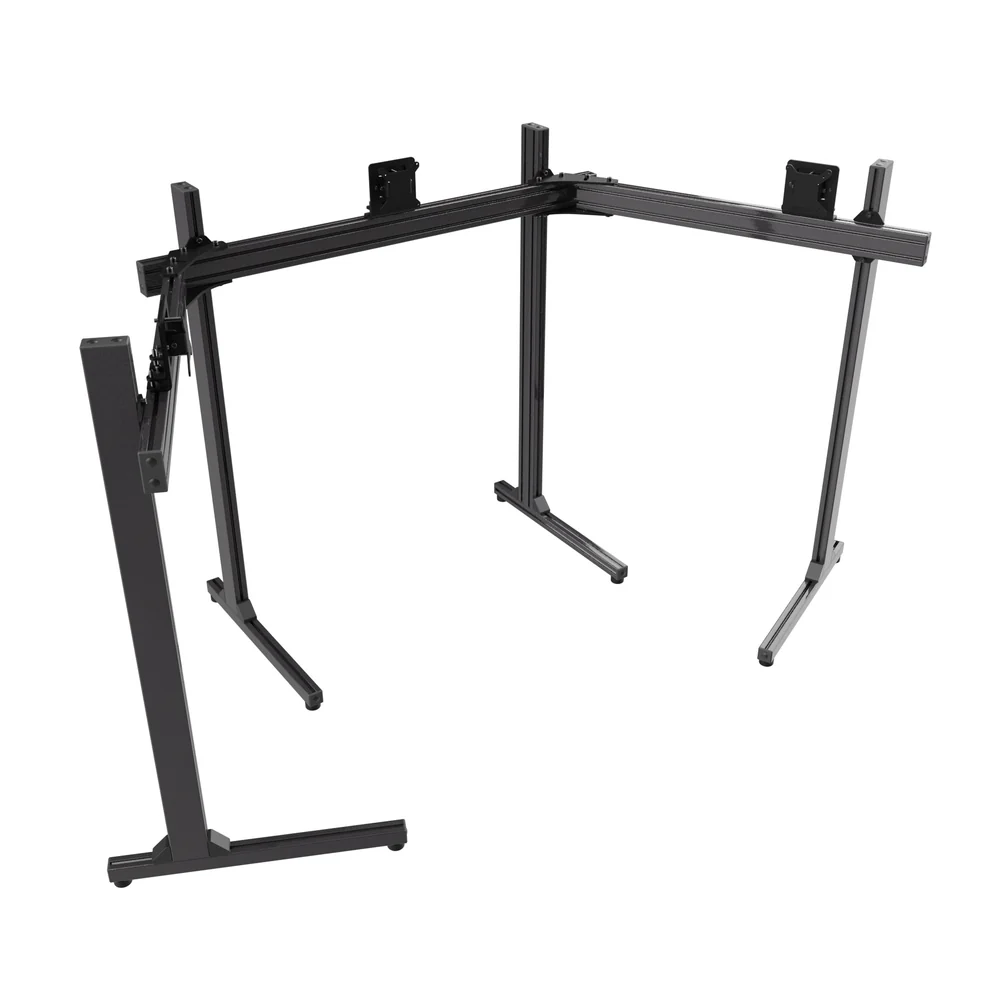
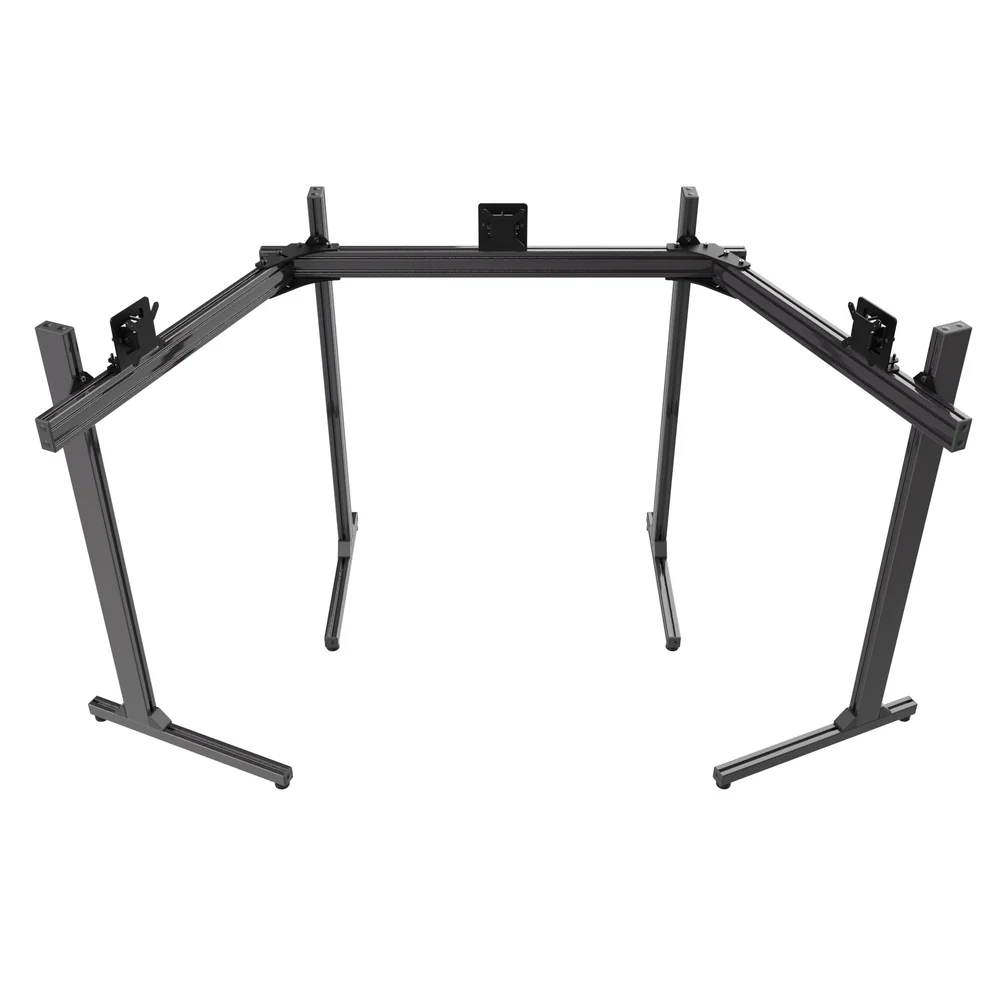
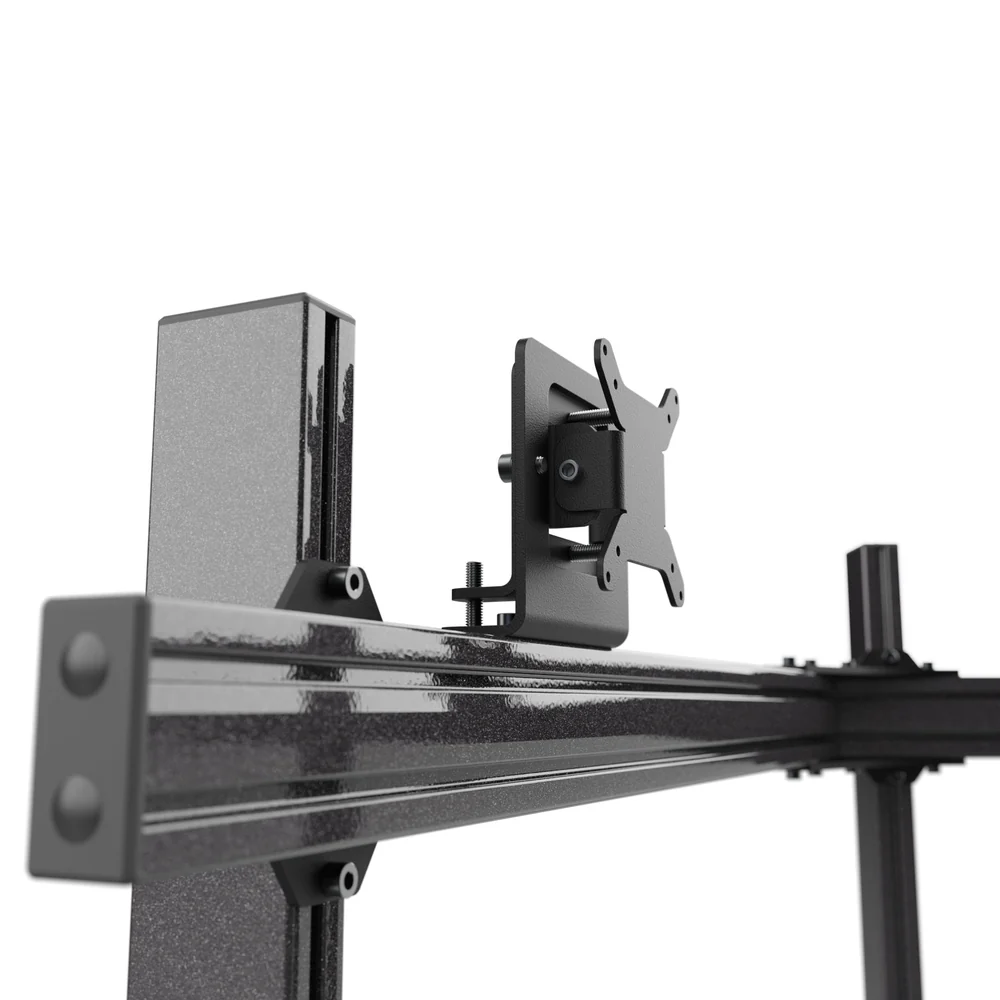
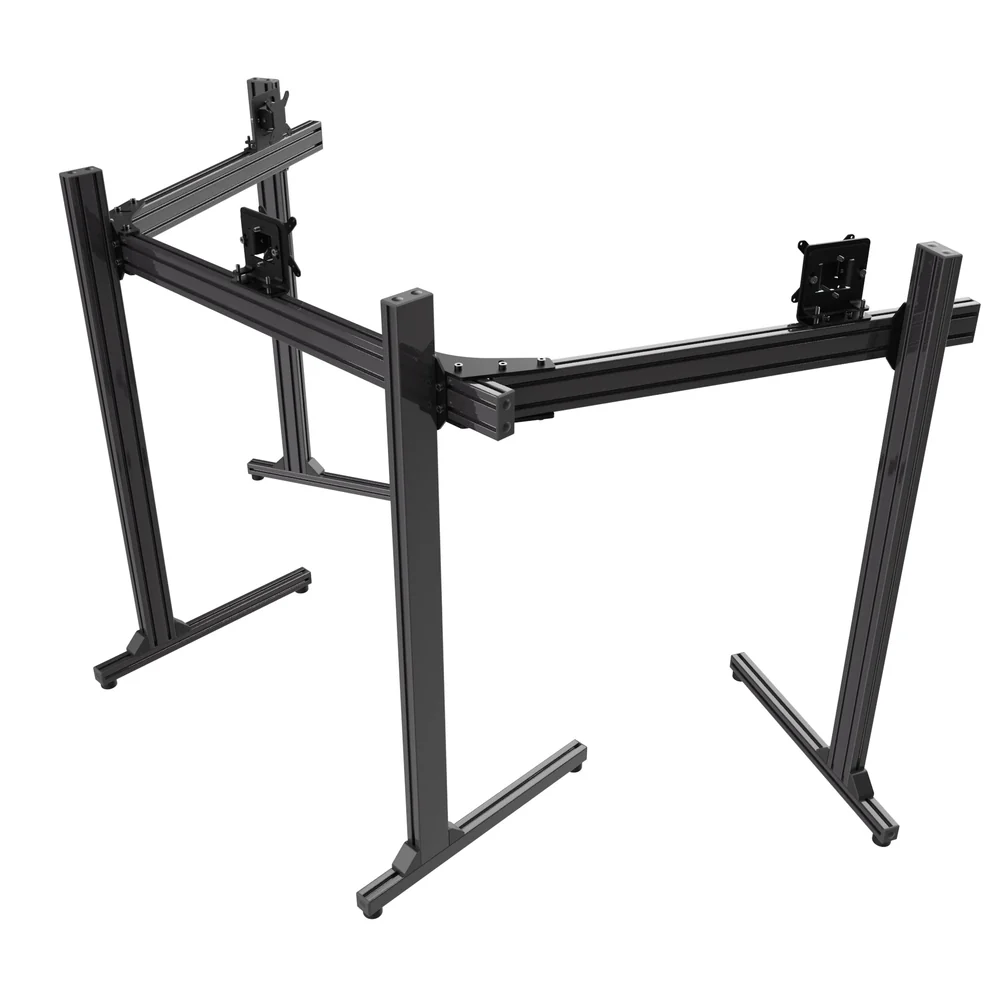
Freestanding Triple TV & Monitor Stand (Up to 50″ TV or 45″ Ultrawide)
Create a cleaner, more immersive screen setup with the Freestanding Triple TV & Monitor Stand (Up to 50″ TV or 45″ Ultrawide). Designed for users who want a wide viewing experience without mounting screens directly to a wall or desk, this stand offers a practical way to bring three displays together in one organised setup.
Whether you are building a three-screen racing simulator, upgrading your gaming station, or creating a multi-screen work area, the right stand can make a major difference. Instead of dealing with separate monitor arms, crowded desks, or screens that sit at different heights, a dedicated triple-screen solution helps you create a more balanced and comfortable layout.
This stand is made for setups that need both flexibility and stability. It supports a TV up to 50 inches or an ultrawide monitor up to 45 inches, making it a useful option for a range of display sizes. As a result, you can plan your screen arrangement around your space, your equipment, and the type of experience you want.
If you are looking for a freestanding triple monitor stand that can help bring your displays together, this product is a strong option to consider.
Why Choose a Freestanding Triple Monitor Stand?
A good screen stand does more than hold your displays. It helps you create a setup that feels organised, comfortable, and ready for everyday use.
With a triple monitor mount, you can position three screens as one viewing area instead of treating each display as a separate part of your setup. This is especially useful when you want a wider field of view for racing, gaming, work, or entertainment.
A freestanding design also gives you more freedom when arranging your equipment. You do not need to rely on a wall for support, and you can place the stand where it works best for your room.
A Cleaner and More Organised Setup
Separate screens can quickly make a desk or simulator area feel crowded. Cables may cross the floor, monitor arms can take up valuable space, and different screen heights can make the setup look uneven.
A TV and monitor stand helps bring the displays into one organised structure. This creates a cleaner appearance and makes it easier to plan the rest of your equipment around the screens.
For sim racing users, this can be particularly helpful. A well-positioned screen setup allows you to focus on your wheel, pedals, and driving position without having to work around several unrelated monitor supports.
A Wider View for Racing and Gaming
A three-screen setup is popular among sim racing enthusiasts because it can create a wider and more engaging view of the track. Instead of seeing only what is directly in front of you, the side screens can help bring more of the racing environment into view.
With the Freestanding Triple TV & Monitor Stand (Up to 50″ TV or 45″ Ultrawide), you can build a screen arrangement that suits your driving position and the size of your room.
The result is a setup that feels more connected. You can see more of the track, follow corners more naturally, and enjoy a stronger sense of immersion while driving.
More Freedom Than a Wall-Mounted Setup
Wall-mounted screens can look neat, but they are not always suitable for every room. You may be renting, you may not want to drill into a wall, or you may want the freedom to move your setup later.
A freestanding triple monitor stand offers a different approach. It gives you a dedicated support structure while allowing you to place your screens where you need them.
This makes it a practical choice for users who want a flexible setup that can change as their equipment or room layout changes.
Designed for Large TVs and Ultrawide Monitors
One of the main benefits of this stand is its support for larger displays. It is designed for a TV up to 50 inches or an ultrawide monitor up to 45 inches, giving you more options when choosing your screens.
A larger display can help create a more engaging experience, especially when you are using multiple screens for racing or gaming. It can also make a work setup easier to manage by giving you more space for applications, documents, and other content.
Up to 50″ TV Support
If you prefer using a TV in your setup, the stand supports a display of up to 50 inches. This makes it suitable for users who want a larger viewing area without moving to a wall-mounted solution.
A TV can be a useful choice for gaming, entertainment, or a racing simulator. It can also work well in a shared space where the setup needs to serve more than one purpose.
Before installation, always check the TV’s mounting pattern, weight, and other compatibility details to make sure it is suitable for your chosen setup.
Up to 45″ Ultrawide Monitor Support
For users who prefer an ultrawide display, the stand supports monitors up to 45 inches. Ultrawide monitors are popular because they provide a wide viewing area while keeping the screen arrangement simple.
A 45-inch ultrawide monitor can be a good choice for racing, productivity, and gaming. It gives you a broad view without requiring the same number of separate displays as a traditional triple-screen setup.
This makes the stand a useful option for users who want flexibility when choosing their screens.
Choose the Display Setup That Works for You
Every setup is different. Some users prefer three separate monitors, while others may want to combine a large TV with additional displays or use a wide ultrawide monitor.
The key is to choose screens that match your needs and the space available. The Freestanding Triple TV & Monitor Stand (Up to 50″ TV or 45″ Ultrawide) gives you a dedicated support solution, so you can focus on building the setup that works best for you.
A Practical Choice for Sim Racing
Sim racing is one of the best uses for a sim racing monitor mount. A wide screen arrangement can help create a more natural driving experience, especially when you want to see more of the track around you.
Instead of looking at a single small display, a triple-screen setup can give you a wider view of the racing environment. This can make it easier to follow corners, spot other cars, and enjoy the feeling of being inside the cockpit.
Build a More Immersive Racing Simulator
A three-screen racing simulator setup can make a major difference to the way you experience a racing game. The screens can help create a wider field of view, which is useful when driving on tracks with many corners or when you need to keep an eye on cars around you.
The stand helps support this type of setup by giving you a dedicated place for your displays. It also helps keep the screens organised, which can make the simulator look more complete and professional.
If you are building a new simulator or upgrading an existing one, this stand can be a useful part of the overall setup.
Keep Your Screens in the Right Position
Screen position matters in sim racing. If the displays are too high, too low, or too far away, the experience may feel less comfortable.
A dedicated sim racing monitor mount helps you plan the screen layout around your driving position. This is important because the best setup is not only about the size of the screens. It is also about how they sit in relation to your eyes, wheel, and seat.
When installing the stand, take time to check the screen height and viewing angle. A little planning can make the setup feel much better during longer racing sessions.
Match Your Screens to Your Racing Gear
A racing simulator often includes a wheelbase, steering wheel, pedals, seat, and other accessories. The screen stand should work alongside these parts rather than getting in the way.
A freestanding design can help you arrange your equipment in a way that feels natural. You can position the stand behind or around your simulator, depending on your room and the type of setup you are building.
This makes it easier to create a racing space that looks clean and works well.
Benefits of a Triple Monitor Mount
A triple monitor mount can offer several benefits for users who want to bring multiple screens together. These benefits are not limited to racing. They can also be useful for gaming, streaming, work, and entertainment.
Better Use of Space
A dedicated stand can help reduce the amount of space taken up by separate monitor supports. This can make your setup feel less crowded and give you more room for other equipment.
For example, a space-saving monitor stand can be useful in a smaller room where every part of the setup needs to serve a purpose.
Instead of having several stands spread across the desk or floor, you can use one central support structure for your displays.
A More Balanced Appearance
When screens are placed on separate stands, they may sit at different heights or angles. This can make the setup look uneven.
A freestanding triple monitor stand helps create a more balanced arrangement. With the screens brought together, the setup can look cleaner and more professional.
This is especially useful if you want your simulator or gaming station to look as good as it performs.
Easier Setup Planning
A dedicated stand gives you a clear starting point when planning your screen layout. You can decide where the stand will sit, how the screens will be arranged, and how the rest of your equipment will fit around it.
This can make the setup process easier, especially when you are working with a large TV or ultrawide monitor.
A Flexible Option for Different Uses
The stand is not limited to one type of setup. It can be useful for a racing simulator, gaming station, or multi-screen work area.
For example, you could use it for:
- A three-screen racing simulator.
- A gaming setup with a wide viewing area.
- A home office with multiple displays.
- A streaming or content creation station.
- A shared entertainment and gaming space.
Because it supports both TVs and ultrawide monitors, it gives you more flexibility when choosing your screens.
How to Plan Your Three-Screen Racing Simulator Setup
A good three-screen racing simulator setup starts with the right planning. Before you install the stand, think about your room, your driving position, and the screens you want to use.
Measure Your Available Space
Start by measuring the area where you plan to place the stand. This is important because large screens can take up more space than expected.
Check the width of the room, the distance from the stand to your seat, and the space needed for your wheel and pedals. This will help you choose a layout that feels comfortable and practical.
Choose the Right Screen Size
The stand supports a TV up to 50 inches or an ultrawide monitor up to 45 inches. However, the best screen size will depend on your room and your preferred viewing distance.
A larger screen can create a wider view, but it may also need more space. A smaller screen may be easier to fit into a compact setup.
Choose the screen size that works best for your needs rather than simply choosing the largest option.
Check Compatibility Before Installation
Before mounting your displays, check their weight, mounting pattern, and other compatibility details. This is important for both safety and stability.
Make sure your screens are suitable for the stand and that the mounting hardware is correct for your chosen displays.
If you are unsure about compatibility, check the product specifications or contact the seller before installation.
Plan Your Viewing Angle
The viewing angle can affect how comfortable your setup feels. A good screen arrangement should allow you to see the displays clearly without needing to turn your head too far.
For sim racing, this can help create a more natural view of the track. For work or gaming, it can make it easier to move between screens.
Take time to adjust the screen position before tightening everything into place.
A Useful Addition to Your Gaming Setup
A TV and monitor stand can also be a useful addition to a gaming setup. Whether you play racing games, flight simulators, strategy games, or other titles, a wider screen arrangement can make the experience more engaging.
A triple-screen setup can also be useful for users who want more space for different types of content. For example, you could have a game on one screen, a chat window on another, and a stream or guide on the third.
More Room for Your Games and Applications
A wide screen arrangement can help you keep more information in view. This can be useful for gaming, streaming, and multitasking.
For example, a user could have a game running on the main display while using the other screens for communication or other tasks.
This makes the stand a practical option for users who want to get more from their screen setup.
A Cleaner Gaming Area
A dedicated adjustable monitor stand can help keep the screens organised and reduce clutter around your gaming area.
Instead of using several separate supports, you can bring the displays together in one structure. This can make the setup look cleaner and give you more room for your keyboard, mouse, or other accessories.
Suitable for Work and Productivity
The Freestanding Triple TV & Monitor Stand (Up to 50″ TV or 45″ Ultrawide) is not only for gaming. It can also be useful for work and productivity.
A multi-screen setup can help users manage more information at once. For example, you could use one screen for documents, another for email, and another for research or other tasks.
Create a More Efficient Work Area
A well-organised screen setup can make it easier to move between applications. This can be useful for users who work with large documents, spreadsheets, design software, or other programs.
The stand helps bring the displays into one organised area, which can make the workspace feel more efficient.
Make Better Use of a Shared Space
If you use the same room for work and entertainment, a freestanding stand can be a practical choice. It gives you a dedicated place for your screens without requiring a permanent wall-mounted installation.
This can be useful in a home office, bedroom, or shared living space.
Installation and Setup Tips
Setting up your stand correctly is important for both safety and performance. Before you begin, make sure you have the right tools and that the installation area is clear.
Read the Product Instructions
Always follow the manufacturer’s installation instructions. These will help you understand how to assemble the stand and how to mount your screens correctly.
If the instructions include specific weight limits or mounting requirements, make sure you follow them carefully.
Check the Stand Is Stable
Once the stand is assembled, check that it sits securely on the floor. A stable stand is important when supporting large displays.
Make sure the base is positioned correctly and that the stand is not leaning or wobbling.
Keep Cables Organised
Cable management is an important part of any multi-screen setup. Try to keep cables routed neatly so they do not become tangled or create a trip hazard.
This can help your setup look cleaner and make it easier to maintain over time.
Test the Screens Before Finalising the Layout
Before you finish the installation, test each screen to make sure it is working correctly. Check the display connections, screen position, and viewing angle.
This gives you a chance to make any adjustments before you complete the setup.
Quality and Reliability Matter
When choosing a stand for your screens, quality and reliability should always be important factors. A good stand should be able to support your displays while helping you create a setup that feels stable and organised.
The Freestanding Triple TV & Monitor Stand (Up to 50″ TV or 45″ Ultrawide) is designed to give users a dedicated support solution for larger TVs and ultrawide monitors.
As with any equipment, it is important to check the product specifications and installation requirements before use. This helps ensure that the stand is suitable for your chosen screens and setup.
Built for Everyday Use
A screen stand should be practical for everyday use. Whether you are racing, gaming, working, or watching entertainment, the stand should help keep your displays in place and your setup organised.
A dedicated support structure can also make it easier to maintain your screen arrangement over time.
A Practical Investment for Your Setup
A good stand can be a useful long-term addition to your equipment. It can help you create a more organised setup now, while also giving you flexibility if you upgrade your screens later.
This makes it a practical choice for users who want to build a setup that can grow with their needs.
Shipping, Safety, and Compatibility
Before purchasing, make sure you check the product details and compatibility information. This is especially important when choosing a stand for large TVs or ultrawide monitors.
Check Your Screen Specifications
Before installation, confirm that your screen is within the supported size and weight range. Also, check that the mounting pattern is compatible with the stand.
If you are unsure, contact the seller for assistance before placing your order.
Follow Safe Installation Practices
Always install the stand according to the manufacturer’s instructions. Make sure the base is secure and that the screens are mounted correctly.
Do not exceed the recommended weight limit, and avoid placing the stand where it could be knocked over or obstruct a walkway.
Check Shipping Information
Shipping times and delivery details may vary depending on your location and the seller’s shipping policy. Before ordering, check the available delivery options and any additional charges that may apply.
If you need help with shipping or product compatibility, contact the seller before completing your purchase.
Why Buy from Peptides Vitals?
At Peptides Vitals, we aim to provide products that help customers build better setups and enjoy their equipment with confidence.
We understand that choosing the right stand is an important part of creating a comfortable and organised space. That is why we focus on providing clear product information and helping customers make informed decisions.
Clear Product Information
We believe customers should have access to the details they need before making a purchase. This includes product specifications, compatibility information, and other useful details that can help you choose the right product.
Support for Your Setup
If you have questions about the Freestanding Triple TV & Monitor Stand (Up to 50″ TV or 45″ Ultrawide), you can contact us for assistance.
Whether you need help understanding the product, checking compatibility, or planning your setup, we are here to help.
A Better Shopping Experience
We aim to make the shopping process simple and straightforward. Our goal is to help you find products that suit your needs and make your setup experience easier.
Who Is This Stand For?
The Freestanding Triple TV & Monitor Stand (Up to 50″ TV or 45″ Ultrawide) is a useful option for a wide range of users.
It may be suitable for:
- Sim racing enthusiasts who want a three-screen setup.
- Gamers who want a wider viewing experience.
- Users who prefer a freestanding display solution.
- People building a multi-screen work area.
- Users who want to avoid wall-mounted screens.
- Anyone looking for a cleaner and more organised screen setup.
If you want a dedicated stand for your displays, this product is worth considering.
Make Your Setup More Immersive Today
A good screen setup can change the way you experience your games, work, and entertainment. With the right stand, you can create a more organised space and enjoy a wider viewing area without relying on separate supports.
The Freestanding Triple TV & Monitor Stand (Up to 50″ TV or 45″ Ultrawide) offers a practical way to bring your displays together. Whether you are building a racing simulator or upgrading your gaming station, it can help you create a setup that feels more complete.
If you are ready to improve your screen arrangement, this stand is a strong option to consider.
Shop the Freestanding Triple TV & Monitor Stand today and start building a cleaner, more immersive setup.
Frequently Asked Questions
What is a freestanding triple monitor stand?
A freestanding triple monitor stand is a support structure designed to hold multiple displays without needing to be attached to a wall or desk. It is useful for users who want to create a three-screen setup.
What size TV can this stand support?
This stand supports a TV up to 50 inches. Always check the product specifications and mounting requirements before installation.
Can I use an ultrawide monitor with this stand?
Yes. The stand supports an ultrawide monitor up to 45 inches, making it suitable for users who prefer a wide display setup.
Is this stand suitable for sim racing?
Yes. It can be a useful addition to a three-screen racing simulator setup. It helps bring the displays together and can support a wider viewing experience.
Can I use this stand for work?
Yes. A triple monitor stand can be useful for work and productivity. It can help you organise multiple displays for documents, applications, and other tasks.
Do I need to drill into a wall?
No. The stand is freestanding, so it does not require wall mounting. However, you should always follow the installation instructions and make sure the stand is placed securely.
How do I know if my monitor is compatible?
Check the monitor’s size, weight, and mounting pattern against the product specifications. If you are unsure, contact the seller before purchasing.
Can I move the stand later?
A freestanding design gives you more flexibility than a wall-mounted setup. However, always follow the manufacturer’s instructions when moving or adjusting the stand.
Conclusion
The Freestanding Triple TV & Monitor Stand (Up to 50″ TV or 45″ Ultrawide) is a practical choice for users who want to create a cleaner, wider, and more organised screen setup.
Whether you are building a three-screen racing simulator, upgrading your gaming station, or creating a multi-screen work area, this stand can help you bring your displays together in one dedicated structure.
With support for larger TVs and ultrawide monitors, it gives you flexibility when choosing your screens. It also offers a freestanding design that can be useful for users who want to avoid wall mounting.
If you are ready to improve your setup, explore the product today and take the next step toward a more immersive and organised screen experience.


Reviews
There are no reviews yet.