
Description
Asetek SimSports Orange Buttons (Encoder + 7-way) – Upgrade Your Sim Racing Controls
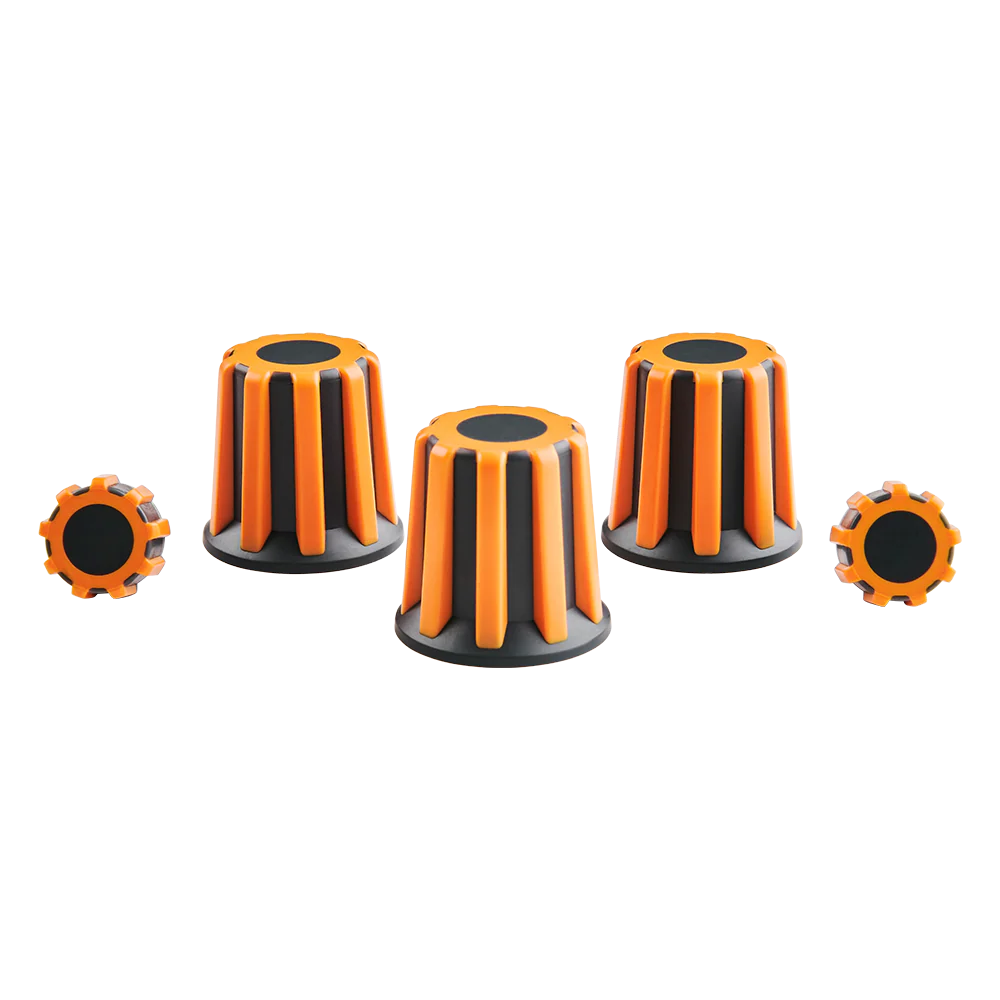
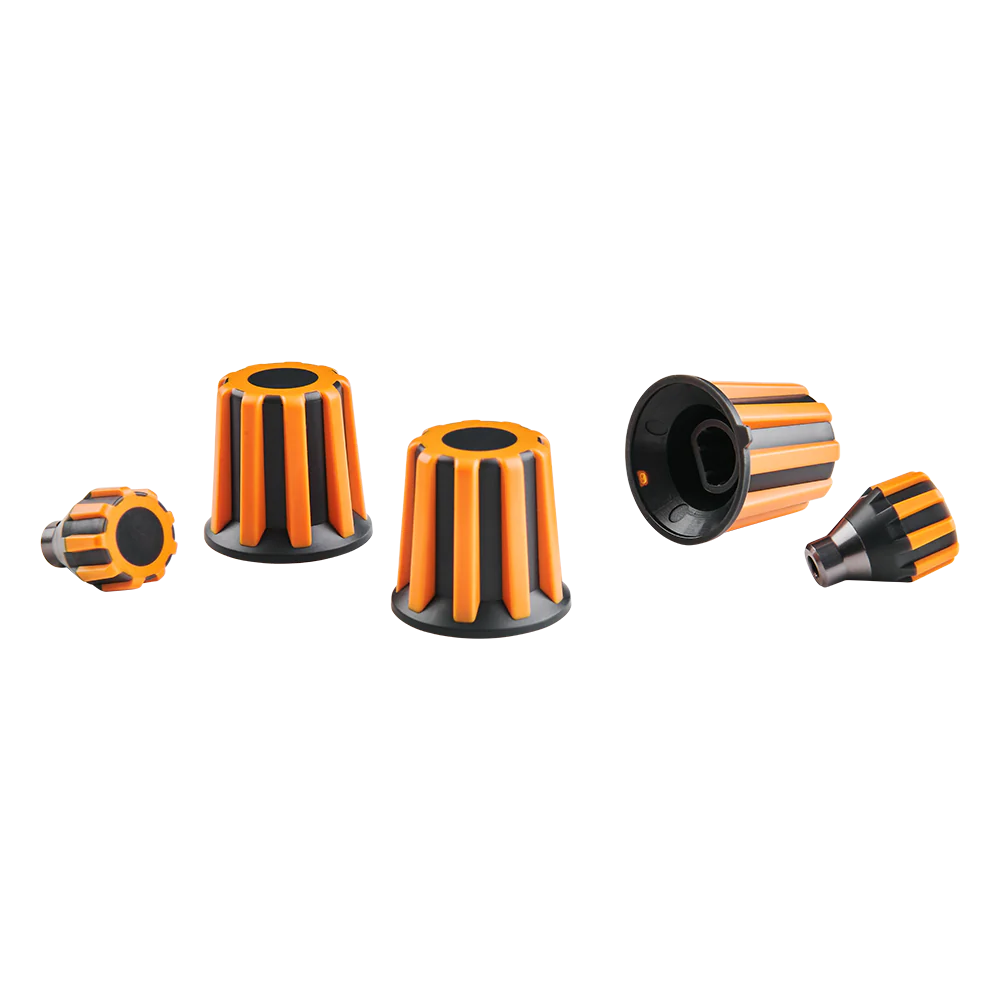
Take your sim racing setup to the next level with Asetek SimSports Orange Buttons (Encoder + 7-way). Designed for sim racers who want responsive, practical, and easy-to-use wheel controls, these buttons can add a fresh feel to your steering wheel while helping you manage key functions without taking your hands away from the wheel.
In competitive sim racing, small controls can make a big difference. A reliable button or encoder gives you quick access to important settings while you focus on braking, steering, and racing lines. Therefore, choosing quality Asetek steering wheel buttons can help create a cleaner and more enjoyable driving experience.
The orange finish also gives your steering wheel a distinctive look. Whether you are refreshing an existing setup or building a more personalized sim racing wheel, these controls offer a simple way to add both function and style.
Asetek SimSports Buttons for Better Wheel Control
Good steering wheel controls should feel natural. They should also be easy to reach when you are driving at speed.
The Asetek SimSports Orange Buttons (Encoder + 7-way) are made for users who want more control from their sim racing wheel. Instead of relying only on keyboard shortcuts or external controls, you can keep important functions close to your hands.
This can be especially useful during races where every second matters.
With a well-organized steering wheel, you can make adjustments without breaking your focus. As a result, your cockpit can feel more streamlined and race-ready.
The orange buttons can also complement a custom wheel layout. They work well for sim racers who enjoy adding personal touches to their equipment while maintaining a professional appearance.
Asetek Encoder Button for Flexible Adjustments
An encoder is useful when you need to make repeated adjustments quickly. Rather than using a standard push button for every command, an encoder can provide a more flexible control method.
The Asetek encoder button is therefore a useful addition for sim racing setups where quick adjustments are important.
Depending on how your wheel is configured, an encoder can be assigned to functions such as menu navigation, setup adjustments, or other in-game controls. This gives you greater flexibility when creating your preferred button layout.
Furthermore, an encoder can reduce the need to move between different controls during a race. That can make your steering wheel easier to operate and more convenient during long sessions.
For serious sim racers, having controls positioned exactly where they are needed can make the cockpit feel more natural.
Why Use a Sim Racing Encoder?
A sim racing encoder can be useful for drivers who want more control options on the steering wheel.
It can support functions that benefit from quick, repeated input. This makes an encoder especially useful for setups where the driver frequently changes settings.
For example, you may want to adjust a setting during practice or make quick changes while preparing for a race. With a suitable encoder control, these actions can be easier to manage.
The result is a steering wheel that provides more than basic button presses.
Asetek 7-way Button for Convenient Navigation
The Asetek 7-way button provides another useful control option for sim racing wheels.
A 7-way control can combine directional inputs with a central press, giving the driver several commands from a single control point. This can help reduce clutter on the wheel while still providing access to multiple functions.
For sim racers who enjoy detailed wheel layouts, this can be a valuable feature.
Instead of filling your steering wheel with numerous individual buttons, you can use a multi-directional control for several functions. Therefore, your wheel can remain compact while still offering a wide range of inputs.
7-Way Encoder Button for Sim Racing
A 7-way encoder button is particularly useful when you want a versatile control within easy reach.
Its multi-function design can help with menu navigation and other assigned commands. However, the exact functions available will depend on your wheel configuration, electronics, software, and compatibility.
That is why it is important to check your specific Asetek SimSports wheel and installation requirements before purchasing.
When correctly installed and configured, a 7-way control can make your wheel layout more practical and easier to use.
Asetek Steering Wheel Buttons Built for a Clean Setup
Your steering wheel is one of the most important parts of a sim racing cockpit. It is where you interact with the car throughout every lap.
For that reason, button placement and control quality matter.
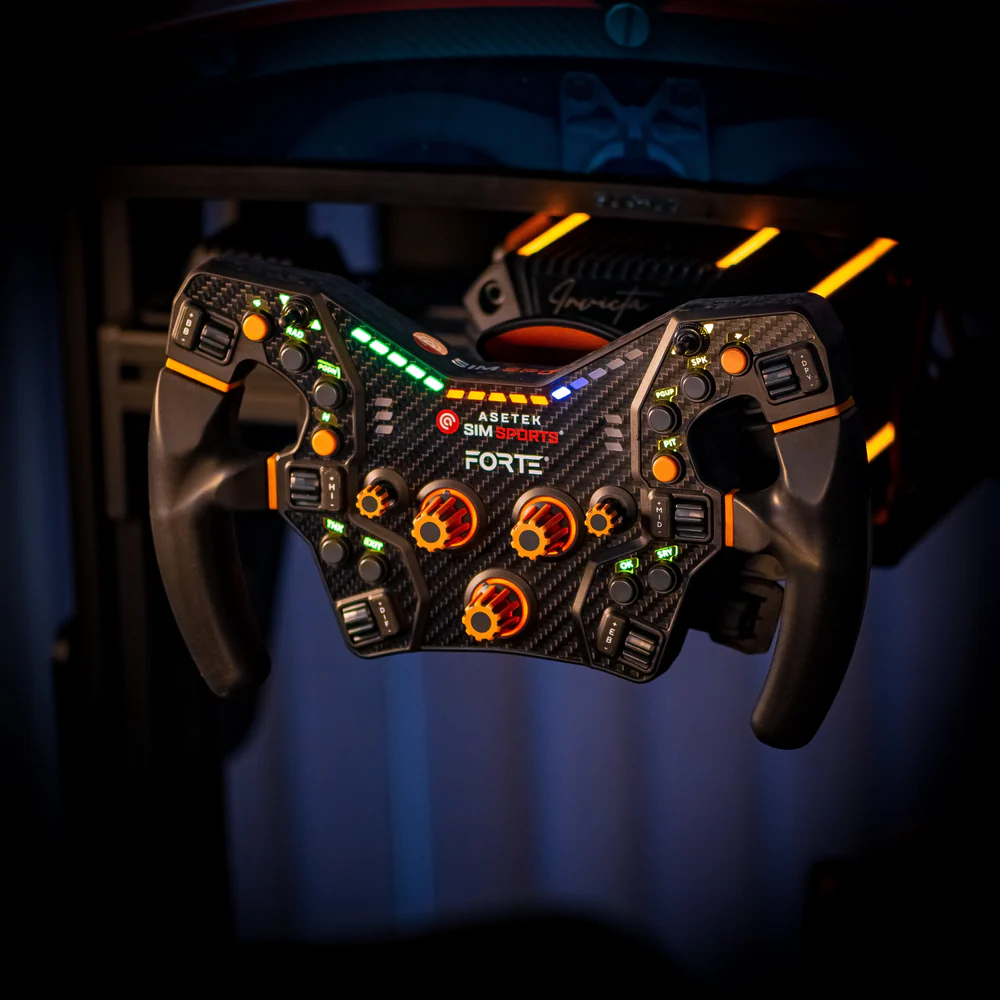
Asetek steering wheel buttons can help you create a more organized control layout. The orange finish can also provide a strong visual contrast, making the controls easy to identify.
This can be useful when you are driving at night or focusing closely on your racing line.
Moreover, the orange color adds personality to the wheel. If you are building a cockpit that combines performance with a custom appearance, colored controls can be a simple but effective upgrade.
Asetek SimSports Accessories for a Personalized Cockpit
Sim racing is not only about the wheel base and pedals. Small components also contribute to the overall experience.
Asetek SimSports accessories can help drivers personalize their equipment and improve how they interact with their cockpit.
A button or encoder may seem like a small part, but it can have an important role in daily use. If your wheel has controls that are difficult to reach or poorly arranged, even a powerful wheel base may not feel as convenient as it should.
By contrast, a well-planned control layout allows you to focus more on driving.
This is why accessories such as buttons, encoders, paddles, and other steering wheel components can be valuable additions to a serious sim racing setup.
Benefits of Asetek SimSports Orange Buttons
Choosing the right steering wheel controls can offer several practical benefits.
Quick Access to Wheel Functions
With controls positioned on the steering wheel, you can access assigned functions without reaching for a keyboard or another device.
This can help keep your attention on the track.
Flexible Control Options
The encoder and 7-way functionality provide more control possibilities than a basic single-action button.
As a result, you can create a layout that matches your driving style and preferred game settings.
Distinctive Orange Finish
The orange design gives your steering wheel a noticeable visual upgrade.
It can also make certain controls easier to identify at a glance.
Better Cockpit Organization
A carefully planned steering wheel layout can reduce unnecessary movement.
Therefore, your cockpit can feel cleaner and easier to operate.
Useful for Sim Racing Enthusiasts
Whether you race GT cars, touring cars, open-wheel cars, or other virtual vehicles, having accessible controls can improve convenience during practice and competition.
Asetek Steering Wheel Controls for Competitive Sim Racing
Competitive sim racing often requires drivers to manage more than steering and braking.
Modern racing simulations can include numerous settings and adjustments. Depending on the simulator and car, drivers may need to manage items such as brake balance, traction control, engine settings, fuel, displays, or other functions.
Having suitable Asetek steering wheel controls can make these tasks easier to manage.
Instead of moving your hands away from the wheel, you can use controls placed within reach.
This becomes even more valuable during longer races. Small improvements in convenience can reduce distractions and help you maintain your focus.
Of course, button functionality depends on your simulator and configuration. Always assign controls according to the functions supported by your specific software and wheel electronics.
Asetek Button Replacement and Wheel Refresh
Sometimes you do not need an entirely new steering wheel.
A small component give an existing setup a fresh look and feel.
For users searching for an Asetek button replacement, it is important to confirm the exact model and compatibility before ordering. Different steering wheels may use different mounting systems, electronics, or button configurations.
A correct fit is essential.
If you are replacing a damaged component, upgrading a layout, or refreshing the appearance of your wheel, check the product specifications carefully.
This helps prevent ordering a part that does not match your existing hardware.
Asetek Wheel Accessories for a Complete Setup
A steering wheel is made up of many components, and each part contributes to the overall driving experience.
Asetek wheel accessories can help you build a setup that suits your preferences.
For example, you may combine your preferred buttons with other wheel controls to create a layout designed around your driving style.
The goal is simple: make every important control easy to reach and understand.
A clean layout can also make your cockpit look more professional.
Whether you are building a first serious rig or refining an established setup, thoughtful component choices can make your equipment more enjoyable to use.
Sim Racing Steering Wheel Parts: Why Small Components Matter
When upgrading a sim racing setup, it is easy to focus only on major components such as direct-drive wheel bases, pedals, or cockpits.
However, sim racing steering wheel parts also deserve attention.
The controls you touch throughout every session should be comfortable and dependable.
A well-designed button layout can improve the way you interact with your simulator. At the same time, replacing worn or unwanted controls can give an older wheel a renewed appearance.
This is why accessories can be an important part of building a better cockpit.
The right components allow you to personalize the wheel without replacing the entire system.
Designed With Sim Racing Convenience in Mind
The best sim racing accessories are those that solve a real problem.
A good control should be easy to locate, simple to operate, and suitable for the intended application.
The Asetek SimSports Orange Buttons (Encoder + 7-way) are aimed at drivers who want additional control flexibility while keeping their steering wheel organized.
The encoder and 7-way design can provide several input options from a compact area.
As a result, the wheel can maintain a clean appearance while still offering useful controls.
For drivers who spend many hours in a simulator, this type of convenience can make a noticeable difference.
Check Compatibility Before Ordering
Before buying any Asetek SimSports buttons, always confirm compatibility with your particular steering wheel and setup.
This is especially important for replacement or installation projects.
Check the product specifications, mounting requirements, electrical connections, and supported wheel models where applicable.
If you are unsure whether a specific control will work with your setup, contact the seller before placing your order.
A quick compatibility check can help ensure that you receive the right component for your project.
Quality and Reliability
Quality matters when choosing components that you will use repeatedly.
Steering wheel controls can receive thousands of inputs over their lifetime. Therefore, it makes sense to choose components designed for the intended application rather than relying on unsuitable generic parts.
The Asetek SimSports Orange Buttons (Encoder + 7-way) are intended for sim racing applications and can be considered when building or maintaining an Asetek-based steering wheel setup.
However, product condition, installation, and compatibility all play a role in long-term reliability.
For the best results, install the component carefully and follow the manufacturer’s guidance where available.
Easy Integration Into Your Sim Racing Project
One of the advantages of choosing dedicated sim racing components is that they can make an upgrade project more focused.
Instead of replacing an entire wheel, you can concentrate on the controls that matter most to you.
This approach can also help you create a more personal setup.
You may prefer a certain button position, color, or control type. By selecting individual racing wheel controls, you can work toward a layout that matches your needs.
However, installation should always be performed with the correct tools and procedures.
If you are not comfortable working with steering wheel electronics, consider using a qualified technician or experienced sim racing specialist.
Shipping and Product Safety
When ordering sim racing components online, choose a seller that provides clear product information and secure checkout options.
Before completing your purchase, review the product description and confirm that the selected component matches your requirements.
Also check shipping information, delivery times, return terms, and any applicable warranty details.
For international customers, customs requirements and import charges may vary by destination.
Safe handling is equally important.
Keep small electronic and mechanical components away from moisture, excessive heat, and conditions that could cause damage. During installation, disconnect equipment as recommended and avoid forcing parts into place.
Why Choose the Right Sim Racing Controls?
A powerful simulator is only part of the experience.
Your ability to interact with it comfortably also matters.
The right Asetek steering wheel controls can help create a cockpit that feels natural and easy to operate. With important functions close to your hands, you can spend less time searching for controls and more time concentrating on your driving.
Furthermore, a personalized wheel can make your simulator more enjoyable.
Every driver has different preferences. Some want more buttons, while others prefer a simple and clean layout. The flexibility of accessories allows you to create a configuration that works for you.
Ideal for Sim Racers Who Want More Control
The Asetek SimSports Orange Buttons (Encoder + 7-way) can be a smart choice for drivers who value flexibility and personalization.
They are particularly relevant to sim racers who:
- Want additional steering wheel controls
- Prefer encoder-based inputs
- Need a 7-way control option
- Want to refresh an existing Asetek wheel
- Like a distinctive orange wheel design
- Are building a custom sim racing cockpit
- Want important controls within easy reach
- Enjoy upgrading individual wheel components
Instead of making a major equipment change, you can focus on the part of the wheel that affects daily interaction.
Build a Better Asetek Sim Racing Setup
A good simulator should feel intuitive.
Your steering wheel should place important functions where you can reach them without unnecessary movement. Your pedals should feel consistent. Your wheel base should deliver the feedback you expect.
Then, the small details bring everything together.
With suitable Asetek SimSports accessories, you can refine the cockpit around your personal preferences.
Buttons and encoders may be small, but they can contribute to a more complete and professional setup.
If you are already using Asetek equipment, adding compatible controls can also help keep the look and feel of your cockpit consistent.
Product Overview
The Asetek SimSports Orange Buttons (Encoder + 7-way) are designed for sim racing enthusiasts looking to improve or personalize their steering wheel controls.
The combination of encoder and 7-way functionality offers flexible input possibilities, while the orange finish adds a distinctive touch to the wheel.
Before purchase, confirm compatibility with your exact Asetek SimSports equipment.
Key Product Highlights
- Asetek SimSports steering wheel accessory
- Orange button design
- Encoder functionality
- 7-way control functionality
- Suitable for sim racing applications
- Useful for custom wheel layouts
- Designed for compatible Asetek setups
- Ideal for steering wheel upgrades and replacement projects
Make Your Steering Wheel Work for You
Your steering wheel should match your driving style.
If you spend hours practicing laps, competing online, or preparing for serious virtual racing events, convenient controls can make your cockpit more enjoyable.
The right control placement allows you to make adjustments while staying focused on the track.
At the same time, a personalized wheel can make your simulator feel more like your own.
That is where quality Asetek steering wheel buttons can make sense.
Rather than settling for a layout that does not suit your needs, you can refine the controls around the way you actually drive.
A Smart Addition for Your Sim Racing Wheel
Choosing individual sim racing steering wheel parts can be a practical way to improve an existing setup.
You do not always need to replace the entire wheel to achieve a better experience.
Sometimes, a carefully selected control is enough to change how the wheel feels and functions.
The Asetek orange encoder and 7-way button combination offers that kind of flexibility for compatible setups.
Whether your goal is improved control, a cleaner wheel layout, or a visual refresh, it can be a useful component to consider.
Ready to Upgrade Your Controls?
If you are looking for a practical way to refine your Asetek sim racing wheel, the Asetek SimSports Orange Buttons (Encoder + 7-way) are worth considering.
Check the compatibility details first. Then, choose the component that matches your wheel and installation requirements.
A better control layout can make your simulator easier to use, more organized, and more personal.
Upgrade your steering wheel controls today and build a sim racing setup that feels made for you.
Final Thoughts
The details matter when building a serious sim racing cockpit.
While wheel bases and pedals often receive the most attention, steering wheel controls play an important role in everyday use.
The Asetek SimSports Orange Buttons (Encoder + 7-way) offer a combination of flexible input options and a distinctive orange finish for compatible Asetek setups.
They can be useful for drivers who want more control, a cleaner layout, or a personalized steering wheel.
Most importantly, always verify compatibility before purchasing or installing any replacement or upgrade component.
With the right accessories, your sim racing wheel can become easier to use and better suited to your driving style.
Explore the right sim racing controls, refine your cockpit, and make every lap count.


Reviews
There are no reviews yet.