
Description
VPG SIM® MISSION SIM WHEEL – Advanced GT & Prototype Sim Racing Control
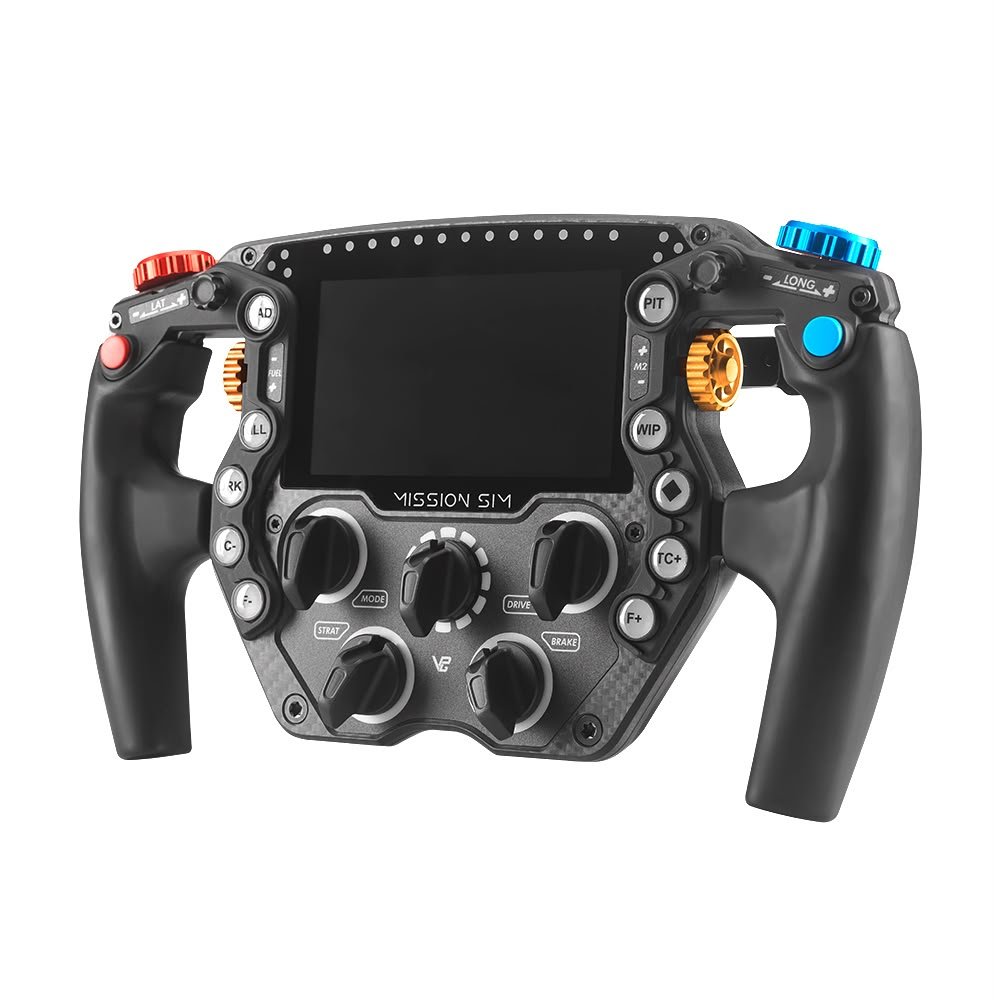
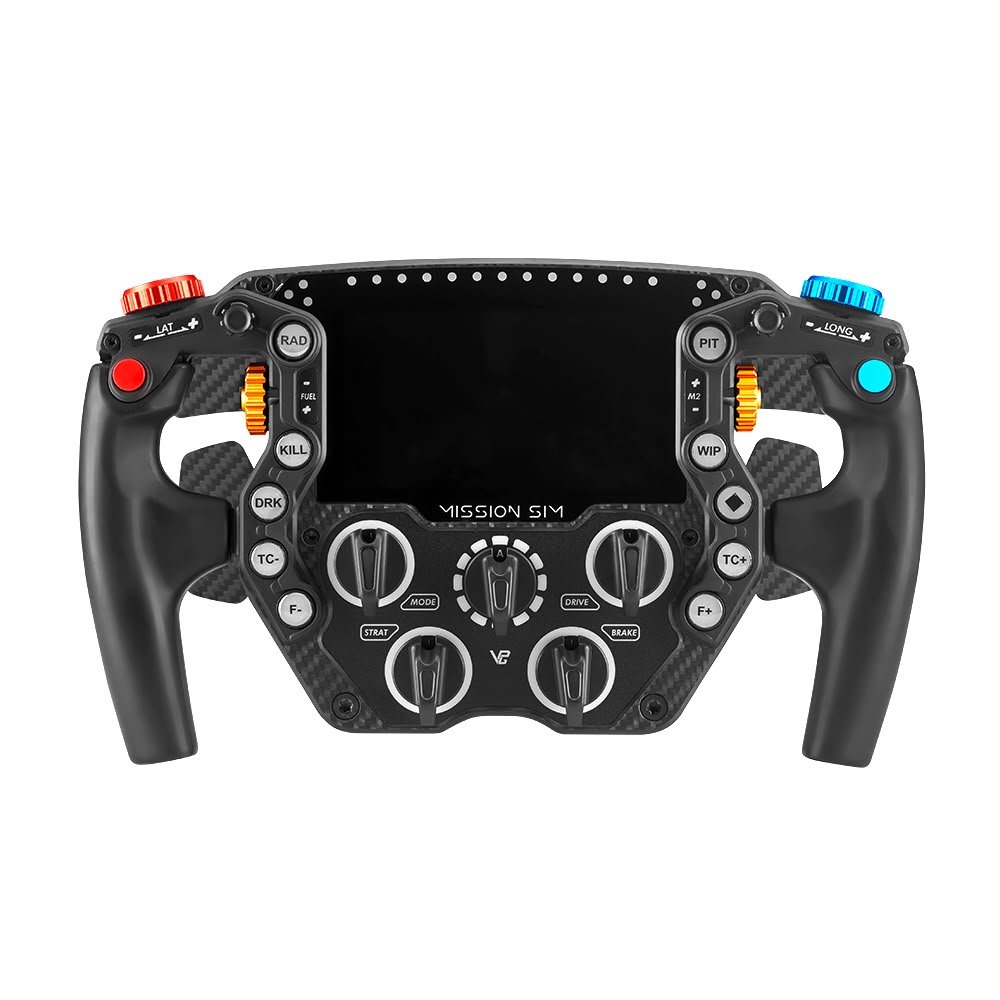
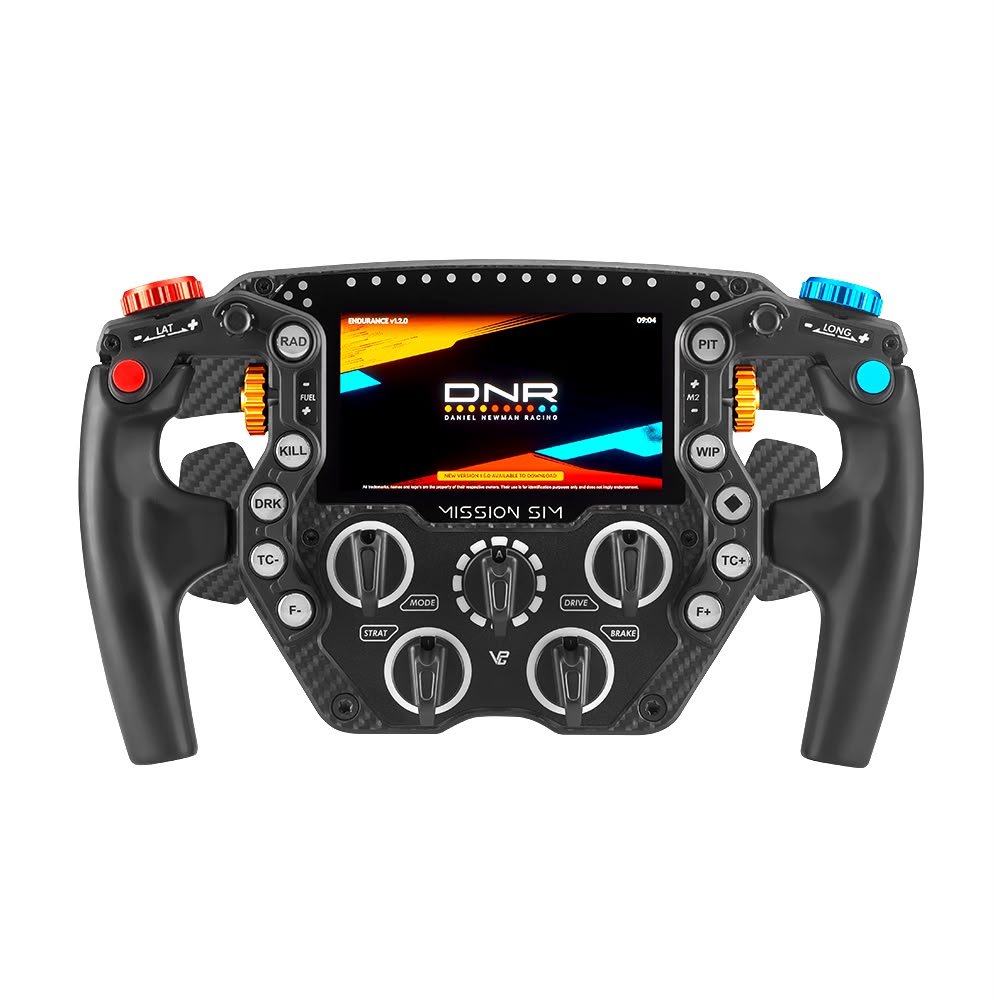
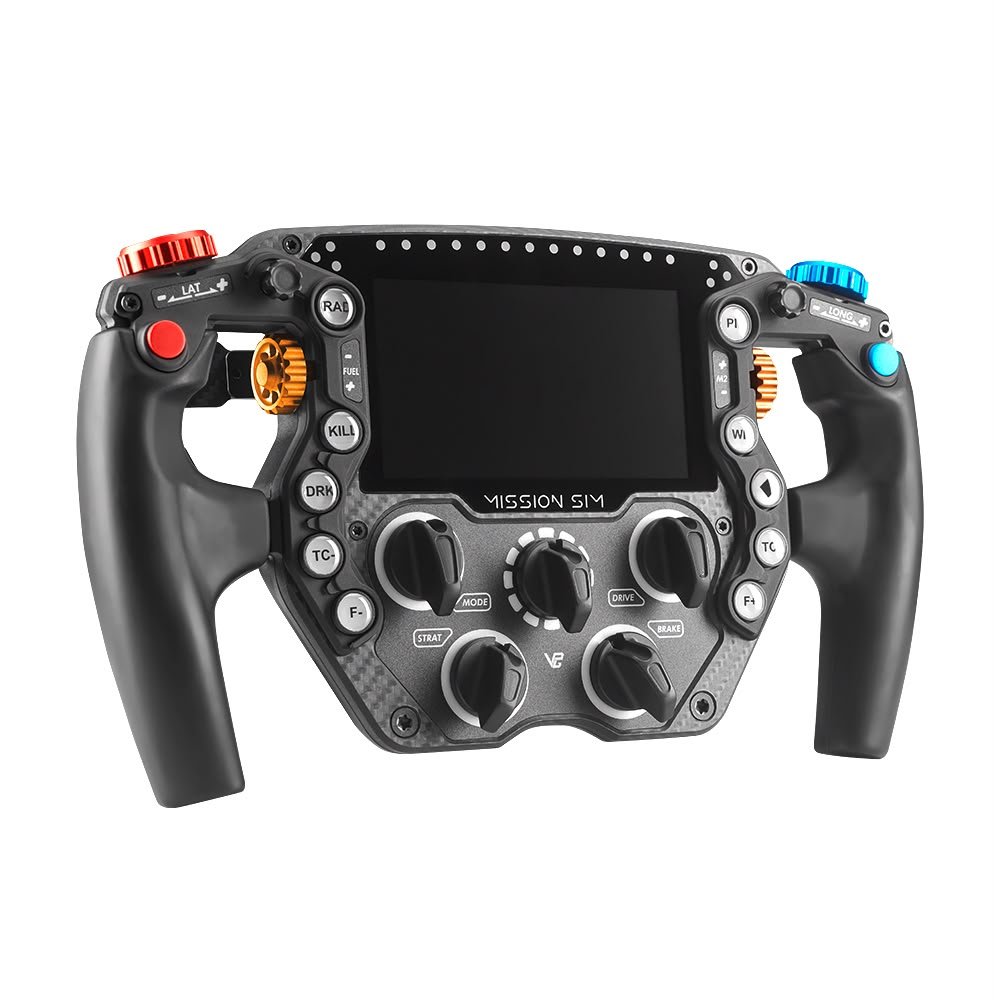
Take your sim racing setup to the next level with the VPG SIM® MISSION SIM WHEEL. Built specifically for serious sim racers, this premium steering wheel combines a lightweight 290 mm design with a large integrated touchscreen, configurable RGB lighting, and a wide range of physical controls.
Instead of adapting a real-world racing wheel for simulation, the Mission Sim was designed from the ground up around the needs of sim racers. Every control is placed with quick access in mind, helping you make important adjustments while keeping your hands firmly on the wheel.
Whether you enjoy GT racing, endurance events, prototype racing, or demanding competitive sessions, this wheel gives you a large amount of control without making the wheel feel unnecessarily heavy.
The result is a clean, focused and highly configurable sim racing experience.
Why Choose the VPG SIM® MISSION SIM WHEEL?
A good sim racing wheel should do more than look impressive. It should help you control the car, access key settings quickly, and keep important information in view.
The VPG SIM® MISSION SIM WHEEL brings these areas together in one compact package.
Its 290 mm diameter offers a useful balance for GT and prototype-style driving. At approximately 1,300 g, the wheel also keeps rotating mass relatively low. This is especially useful when paired with a high-performance direct drive wheelbase where force feedback detail and fast response matter.
In addition, the wheel includes a built-in 5-inch touchscreen. This gives you a dedicated place for useful racing information without needing to rely only on a separate dashboard.
The 118 configurable RGB LEDs add another layer of information. Depending on your software and setup, the lighting can be used for shift information, warnings, telemetry and other visual cues.
Most importantly, the Mission Sim is designed around practical control.
VPG Mission Sim Steering Wheel for Serious Sim Racers
The VPG Mission Sim steering wheel is aimed at drivers who want more control from the wheel itself.
During a long race, you may need to change brake bias, traction control, engine settings, fuel settings or other car controls. Reaching for a keyboard or another button box can take your attention away from the track.
The Mission Sim gives you many controls directly on the wheel.
This can make a difference during endurance racing and other events where small adjustments are part of the driving process.
The control layout also helps reduce the need to move your hands away from the main grip areas. As a result, you can focus more on driving while still having quick access to the settings you use most.
For advanced sim racers, this level of control can make a wheel much more useful than a basic steering rim.
290mm Sim Racing Wheel Design
The 290 mm size of the Mission Sim gives it a compact racing feel while still providing enough room for a wide range of controls.
This makes it well suited to GT, prototype and formula-style sim racing.
The wheel is built with a carbon fibre front plate and an aluminium rear structure. This construction is designed to provide stiffness while keeping the overall weight under control.
A rigid wheel is important because unwanted flex can reduce the feeling of direct connection between your hands and the wheelbase.
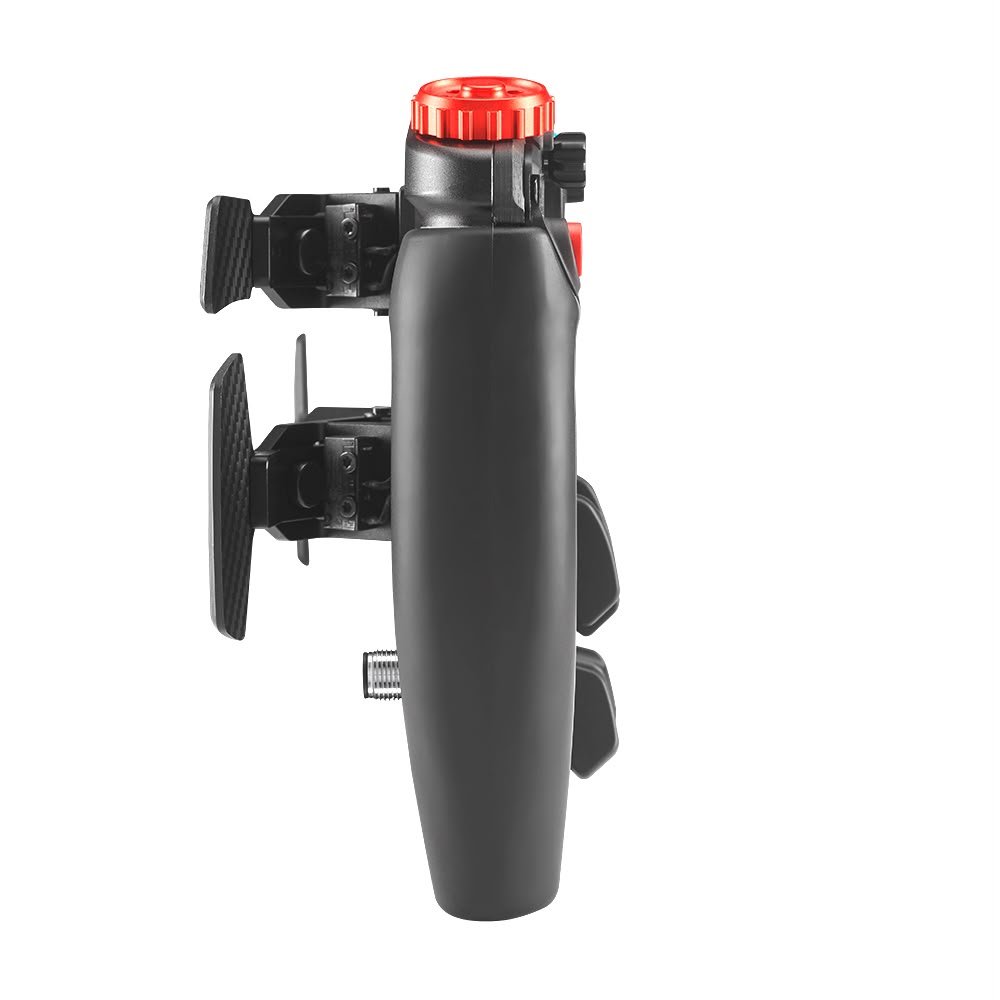
The Mission Sim also uses ergonomic grips to provide a comfortable place for your hands during longer sessions.
Because the wheel is designed specifically for simulation, its layout focuses on access to controls rather than copying every detail of a particular real-world steering wheel.
That approach makes it a practical option for drivers who want a modern high-end sim racing wheel.
Sim Racing Wheel with Integrated 5-Inch Touchscreen
One of the most noticeable features of the Mission Sim is its integrated 5-inch touchscreen.
Instead of placing every piece of information on a separate dashboard, the wheel can provide important information directly in front of you.
The display can be used with compatible software and dashboards to show useful racing information.
For example, you may use the screen for telemetry, gear information, lap data, alerts or other information that helps you understand what the car is doing.
The screen also adds to the overall feel of a modern racing simulator.
For drivers who enjoy building a clean cockpit, having information built into the steering wheel can help reduce the need for additional displays around the rig.
It is a practical feature as well as a visual upgrade.
118 Configurable RGB LEDs
The Mission Sim also features 118 configurable RGB LEDs.
Lighting can provide information without requiring you to look away from the racing line for long periods.
Depending on your software configuration, the LEDs can be used for shift lights, warnings, flags, telemetry information and other visual signals.
This makes the wheel especially useful in competitive driving where quick reactions matter.
The lighting can also be customised to suit your own setup and preferences.
You can create a simple lighting layout or build a more detailed profile that uses different areas of the wheel for different types of information.
Combined with the integrated touchscreen, the LED system gives the Mission Sim a strong focus on information and control.
60 Physical Controls for Greater Control
A major advantage of the VPG Mission Sim wheel is the number of controls built directly into the wheel.
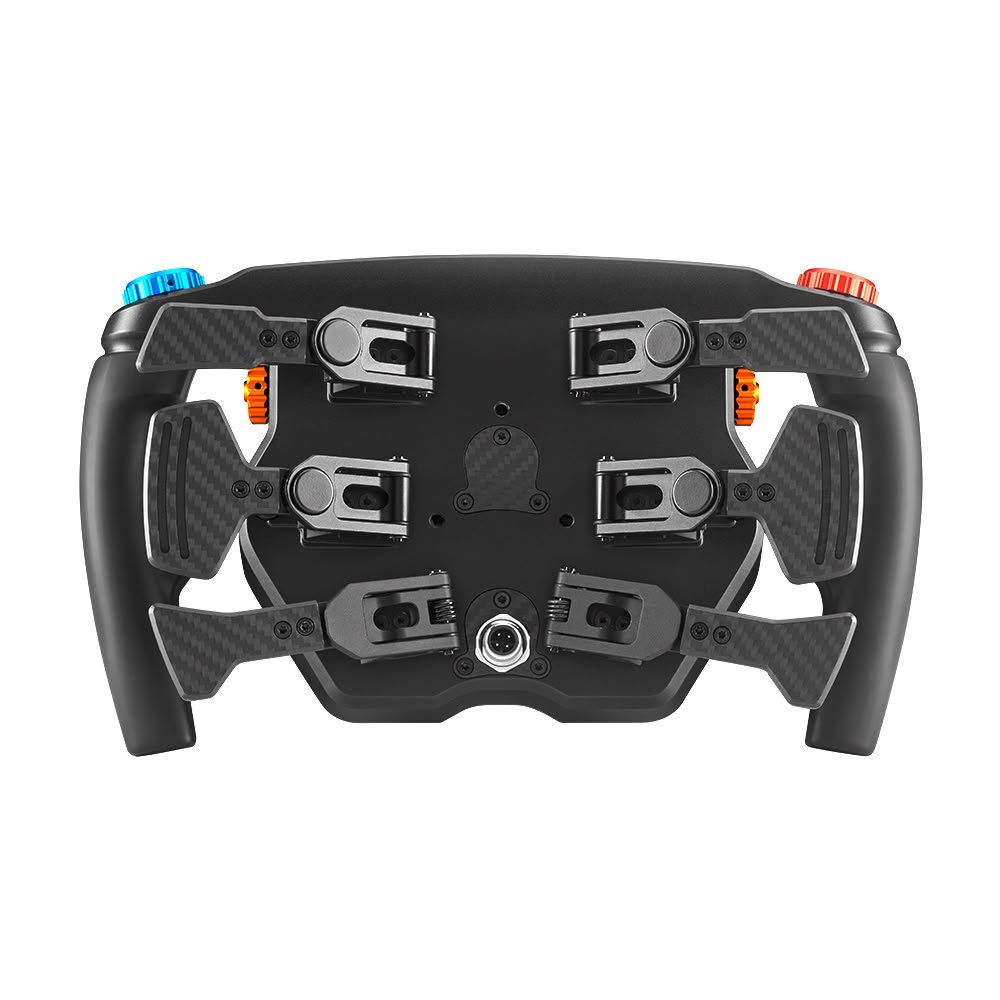
The wheel provides 60 physical inputs, including front buttons, rear controls, rotary encoders, funky switches and a multi-position selector.
This gives you plenty of options when setting up your controls for different racing games.
You can assign the functions you use most often to convenient positions on the wheel.
For endurance racing, this can be particularly useful because the driver may need to manage many car settings during a single race.
Instead of using several separate devices, many important functions can be placed directly within reach.
The wheel can also support up to 128 programmable inputs through VPG Console, giving advanced users even more freedom when creating their preferred control layout.
VPG Console for Advanced Configuration
The VPG SIM® MISSION SIM WHEEL works with VPG Console for configuration and control.
This software gives you greater flexibility when assigning functions to the available controls.
With programmable inputs, you can build a setup that matches the way you drive.
For example, you can assign rotary controls to settings that need regular adjustment while placing frequently used buttons in positions that are easy to reach.
This level of configuration is useful for drivers who compete across several types of racing.
You may prefer one layout for GT racing and another for prototype or endurance racing.
Rather than being limited to a fixed arrangement, the Mission Sim gives you room to create a control setup that works for you.
SimHub Compatible Steering Wheel
The Mission Sim is also compatible with SimHub.
SimHub is widely used by sim racers to create dashboards, telemetry displays and other forms of custom racing information.
With SimHub support, you can make better use of the wheel’s display and lighting features.
This allows your wheel to become more than a basic input device.
It can also act as an information centre during your race.
You can build your preferred dashboard and visual layout around the information that matters most to you.
This makes the Mission Sim particularly attractive to sim racers who enjoy customising their rigs.
Carbon Fibre and Aluminium Construction
The construction of a high-end steering wheel matters because the wheel sits directly between the driver and the wheelbase.
The Mission Sim uses a carbon fibre front plate with an aluminium rear structure.
This combination gives the wheel a strong and premium feel while keeping its weight under control.
The use of aluminium also supports the rigid structure required for demanding direct drive systems.
At the same time, the carbon fibre front gives the wheel a clean motorsport-inspired appearance.
For a premium sim racing cockpit, the Mission Sim fits naturally alongside high-end wheelbases, pedals, seats and chassis systems.
It is designed to be a performance component rather than simply a decorative upgrade.
Lightweight 1,300g Construction
Weight is an important consideration when choosing a steering wheel for a direct drive system.
The Mission Sim weighs approximately 1,300 g.
Keeping the wheel relatively light can help reduce rotational inertia.
This matters because the wheelbase has to accelerate and change the direction of the wheel during force feedback effects.
A lighter wheel can therefore help a direct drive system communicate its feedback more clearly and quickly.
The exact experience will also depend on the wheelbase, force feedback settings and overall simulator configuration.
For drivers building a high-end direct drive setup, the lightweight design is an important part of the Mission Sim concept.
Controls Designed for Racing
The Mission Sim includes a selection of physical controls designed for quick access.
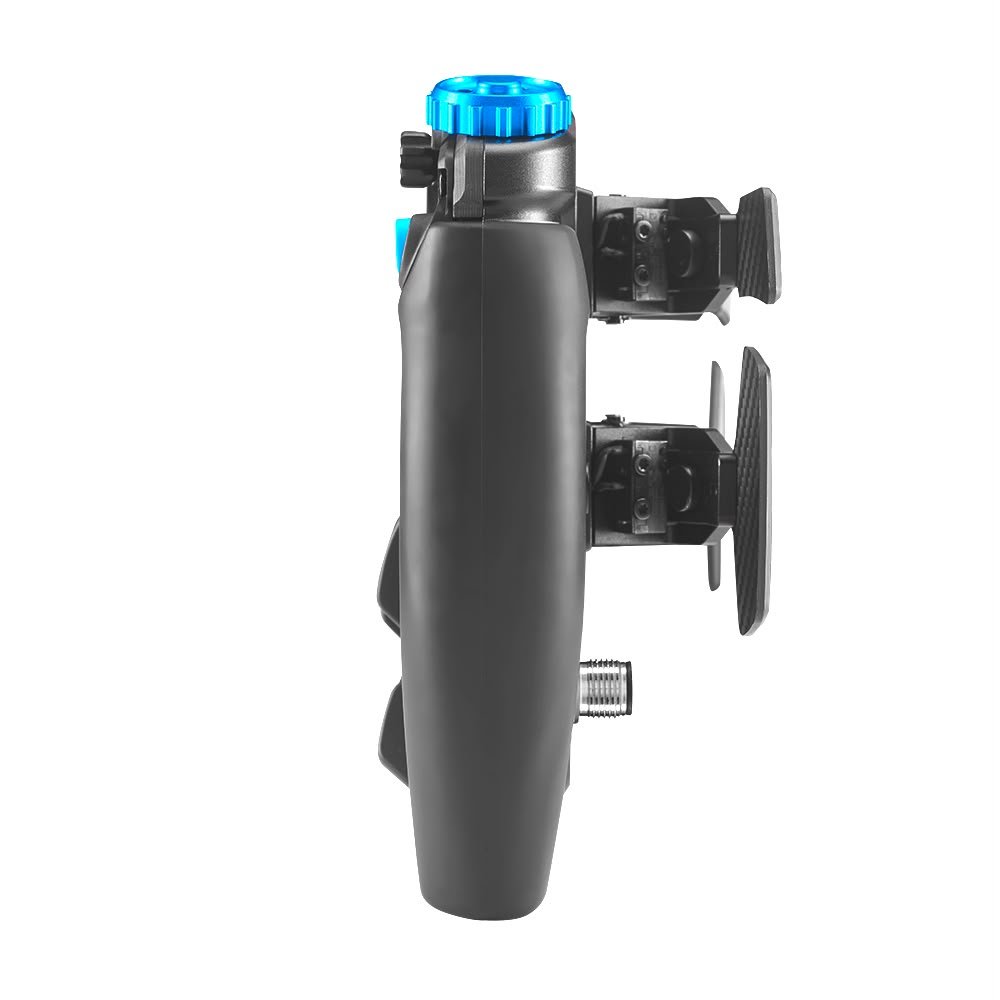
These include 12 APEM front buttons, rear Magic buttons, funky switches, thumb rotary encoders, front rotary encoders and an ELMA 12-position multi-switch.
Each type of control can serve a different purpose.
Buttons are useful for quick on/off functions.
Rotary encoders are useful for settings that need repeated adjustment.
Multi-position controls can provide access to several selectable settings from one physical control.
This combination makes the wheel suitable for cars that require a high level of driver input.
It is especially useful when the simulator allows you to control detailed vehicle settings from the steering wheel.
A GT Sim Racing Wheel for Endurance Racing
The GT sim racing wheel category requires a good balance between control, visibility and comfort.
Endurance racing adds another challenge because drivers must remain focused for long periods.
The Mission Sim is designed with this type of racing in mind.
Its large selection of controls can help you manage important settings without constantly reaching away from the wheel.
The touchscreen can provide useful information while the RGB LEDs can provide quick visual signals.
Together, these features create a wheel that is designed to keep more of the information and controls directly in front of the driver.
For a serious endurance simulator, that can help create a more focused cockpit.
Prototype Sim Racing Wheel Performance
Prototype racing can involve a large amount of driver interaction.
Modern prototype cars can require adjustments to many systems during a race.
That is where the control density of the Mission Sim becomes useful.
The wheel provides numerous physical controls and can support additional programmable inputs through VPG Console.
This means drivers have plenty of options when deciding how to assign their controls.
You can create a layout that puts the functions you use most often in convenient positions.
As a result, the Mission Sim can work well as a prototype sim racing wheel for drivers who want a detailed and flexible control system.
Formula-Style Sim Racing Wheel Feel
The compact racing shape also makes the Mission Sim suitable for drivers who prefer a formula-style sim racing wheel.
Its 290 mm diameter keeps the wheel compact while leaving room for the large control layout.
The result is a modern racing wheel designed around simulation rather than a standard road-car steering wheel.
If your simulator focuses on open-wheel or prototype cars, the Mission Sim can complement the driving position and control style of those cars.
It also works well for drivers who want a single premium wheel that can be used across several racing disciplines.
Low Rotational Mass for Direct Drive Wheelbases
A premium steering wheel should work with the strengths of the wheelbase underneath it.
Direct drive wheelbases are known for strong and detailed force feedback.
The steering wheel therefore needs to provide a firm connection without adding unnecessary weight.
The Mission Sim’s approximately 1,300 g weight helps keep its rotating mass under control.
This can allow the wheelbase to respond quickly to changes in force feedback.
You should still choose the wheelbase and force feedback settings that match your own preferences.
However, the lightweight design makes the Mission Sim a natural match for serious direct drive sim racing setups.
A High-End Sim Racing Wheel for Custom Cockpits
The Mission Sim is designed for drivers who are already investing in a serious simulator.
It can sit alongside high-end direct drive wheelbases, load cell or hydraulic pedals, aluminium profile cockpits, motion systems and large display setups.
The wheel’s integrated display and LED system can also reduce the need for additional hardware around the wheel area.
This can help create a cleaner cockpit.
For sim racers who care about both performance and presentation, the carbon fibre and aluminium construction gives the wheel a premium appearance without relying on unnecessary styling.
Everything has a clear purpose.
Who Is the VPG Mission Sim Wheel For?
The VPG Mission Sim wheel is designed for drivers who want advanced control and a high level of customisation.
It can be a strong fit for:
- GT sim racers
- Endurance racing enthusiasts
- Prototype racing drivers
- Formula racing fans
- Competitive sim racers
- Esports-focused setups
- Direct drive wheelbase owners
- Drivers who enjoy custom dashboards
- Sim racers who want integrated LEDs
- Users who need many programmable controls
It is particularly suited to people who want their steering wheel to become a central part of the simulator rather than simply a device for steering.
Why the Mission Sim Stands Out
The Mission Sim combines several features that are normally spread across multiple cockpit components.
You get a touchscreen.
You get a large LED system.
You get a high number of physical controls.
You get programmable inputs.
You get SimHub compatibility.
You also get a lightweight carbon fibre and aluminium structure.
The advantage is not just having a long feature list.
The real benefit is how these features work together.
The display gives you information.
The LEDs give you quick visual signals.
The physical controls give you direct access to car functions.
The software gives you configuration options.
The lightweight construction helps maintain a responsive connection with your wheelbase.
Build Quality and Reliability
VPG designed the Mission Sim specifically for demanding sim racing use.
The construction combines carbon fibre and aluminium, while the wheel uses dedicated physical controls and aluminium paddles.
This gives the product a serious motorsport-inspired build.
For a product at this level, the quality of the individual controls matters just as much as the overall appearance.
Buttons, switches, encoders and paddles all need to provide consistent operation because they may be used thousands of times during regular racing.
The Mission Sim is built around that principle, with a focus on practical control and long-term use.
Always follow the manufacturer’s setup and connection instructions to ensure reliable operation.
Connection and Setup
The Mission Sim connects to a PC through USB.
For reliable operation, proper USB connection is important.
VPG recommends connecting the wheel through a powered USB hub positioned close to the wheelbase area when required.
Cable routing should also be planned carefully around the simulator.
Avoid unnecessary cable extensions and follow the manufacturer’s connection guidance.
A clean connection can help prevent common setup problems and makes the overall cockpit easier to maintain.
Before racing, check that the wheel, display, LEDs and controls are correctly recognised by your simulator software.
PC Compatibility
The Mission Sim is designed for PC sim racing.
It works with compatible Windows-based simulator setups and supports software such as VPG Console and SimHub.
Before purchasing, make sure your computer and simulator software meet the required compatibility conditions.
You should also confirm that your chosen wheelbase mounting system and quick-release configuration match the version of the wheel you select.
This is especially important when building a new simulator from separate components.
Wheel Mounting and Configuration
The Mission Sim can be configured with different hub and quick-release options.
Depending on the selected setup, mounting compatibility may vary.
The standard mounting pattern and optional spacer configurations should be checked before placing an order.
If you are upgrading an existing cockpit, confirm the mounting dimensions of your wheelbase and quick-release system first.
This simple check can prevent compatibility issues during installation.
Pair It With a Premium Direct Drive Wheelbase
The Mission Sim is designed to complement high-performance direct drive wheelbases.
A good wheelbase provides the force feedback.
The wheel gives you the interface for controlling the car and receiving visual information.
When combined correctly, the two components can create a more connected driving experience.
For a premium simulator, you can pair the wheel with a strong direct drive wheelbase, performance pedals and a rigid cockpit.
The result is a setup designed for drivers who want detailed feedback and a high level of control.
Upgrade Your Complete Sim Racing Setup
A steering wheel is only one part of a complete simulator.
For the best overall experience, consider matching the Mission Sim with a suitable cockpit, direct drive wheelbase, racing pedals and monitor setup.
A rigid cockpit can provide a stable platform.
A quality pedal set can improve braking control.
A direct drive wheelbase can deliver detailed force feedback.
Then, the Mission Sim brings the controls and information together at the driver’s hands.
This creates a balanced simulator rather than a collection of unrelated components.
Shipping and Product Care
Before ordering, review the available shipping options, delivery estimates and product availability shown on your store.
Premium sim racing hardware should be packed and handled carefully during delivery.
Once the wheel arrives, inspect the packaging and product before installation.
Keep all original packaging and accessories until you have confirmed that the wheel is working correctly.
For installation, use the correct mounting hardware and avoid forcing connectors or controls into place.
Always follow the manufacturer’s instructions for setup, software installation and cable connection.
Safety and Compliance
Use the Mission Sim only with compatible sim racing equipment and software.
Make sure the steering wheel is firmly attached before starting a race.
Check that all cables are routed safely and cannot interfere with the movement of the wheel or other simulator components.
Do not modify internal electronics unless the manufacturer or an authorised service provider instructs you to do so.
For the best results, use official software and follow the manufacturer’s recommended installation and operating procedures.
Is the VPG Mission Sim Wheel Worth Adding to a Premium Rig?
The Mission Sim is designed for sim racers who want more than basic steering controls.
Its large number of physical inputs, integrated touchscreen, configurable LEDs and programmable functions make it a highly detailed control centre for the simulator.
The 290 mm format also provides a compact racing feel while the 1,300 g construction keeps the overall wheel relatively light.
For a driver building a premium PC sim racing setup, these features can provide a practical way to bring more controls and information directly onto the steering wheel.
The right choice will always depend on your simulator, wheelbase, preferred racing disciplines and budget.
However, if your goal is a highly configurable racing cockpit, the Mission Sim provides the type of control and display features that advanced users often look for.
Frequently Asked Questions
What is the VPG SIM® MISSION SIM WHEEL?
The VPG SIM® MISSION SIM WHEEL is a high-end sim racing steering wheel designed specifically for PC simulation. It features a 290 mm diameter, integrated touchscreen, configurable RGB LEDs and a large number of physical controls.
How many controls does the Mission Sim have?
The wheel provides 60 physical inputs and can support up to 128 programmable inputs through VPG Console.
Does the Mission Sim have a screen?
Yes. The wheel features an integrated 5-inch touchscreen designed to display useful racing and telemetry information when configured with compatible software.
How many LEDs are on the wheel?
The Mission Sim features 118 configurable RGB LEDs.
Is the Mission Sim compatible with SimHub?
Yes. The wheel supports SimHub, allowing users to configure compatible dashboards and visual information.
How much does the Mission Sim weigh?
The wheel weighs approximately 1,300 g.
What is the diameter of the Mission Sim?
The Mission Sim has a diameter of 290 mm.
What materials are used?
The wheel uses a carbon fibre front plate and an aluminium rear structure, along with ergonomic grips and aluminium controls in key areas.
Is the Mission Sim suitable for direct drive?
Yes. Its lightweight construction and racing-focused design make it well suited to high-performance direct drive sim racing setups.
Can the controls be programmed?
Yes. VPG Console supports programmable inputs, giving users the ability to customise the wheel’s controls for their preferred racing games and cars.
Is the Mission Sim suitable for endurance racing?
Yes. Its large number of accessible controls can be useful for endurance racing where drivers often need to adjust multiple car settings during a race.
Is the Mission Sim suitable for GT racing?
Yes. The 290 mm size, control layout and integrated display make it suitable for GT-style sim racing.
Can I use the wheel with different racing games?
The wheel is designed for PC sim racing. Actual game compatibility depends on the simulator and how its controls can be configured.
Build a More Connected Racing Experience
The right steering wheel can change how you interact with a simulator.
Instead of reaching for a keyboard or separate button box, the Mission Sim puts a large number of controls directly in front of you.
Its touchscreen can provide useful information.
Its LEDs can provide quick visual signals.
Its programmable controls can be configured around your preferred cars and racing games.
At the same time, its lightweight construction helps it remain well suited to modern direct drive wheelbases.
This makes the Mission Sim a complete control solution for drivers who want a clean and advanced cockpit.
Shop the VPG SIM® MISSION SIM WHEEL
If you are building a serious sim racing setup, the VPG SIM® MISSION SIM WHEEL is designed to give you more control, more information and more customisation from the driver’s seat.
With its 290 mm racing format, carbon fibre and aluminium construction, 5-inch touchscreen, 118 RGB LEDs and up to 128 programmable inputs, it provides a feature-rich solution for advanced PC sim racing.
Choose the configuration that matches your wheelbase and mounting setup, complete your cockpit with compatible sim racing hardware, and take your driving experience further.
Explore the Mission Sim today and build a simulator that is designed around the way you actually race.
Final Thoughts
The VPG SIM® MISSION SIM WHEEL brings steering, controls and racing information together in one advanced package.
Its lightweight 1,300 g construction is designed to work well with modern direct drive wheelbases. The 290 mm diameter provides a focused racing feel, while the integrated 5-inch touchscreen and 118 RGB LEDs add useful information directly to the wheel.
With 60 physical inputs and support for up to 128 programmable inputs through VPG Console, there is also plenty of room for customisation.
For GT, endurance, prototype and formula-style sim racing, the Mission Sim is built around one simple idea: give the driver more control without taking their attention away from the track.
Choose the VPG SIM® MISSION SIM WHEEL for a premium, highly configurable steering solution designed for serious PC sim racing.


Reviews
There are no reviews yet.